Value Looper
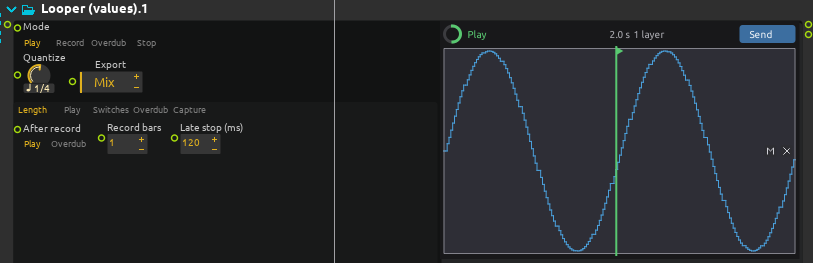
The process named Looper (values) records the values it receives at in into a loop, and plays them back at out: numbers, booleans, vectors, text, lists, maps and impulses, from any source, such as an LFO, a sensor, a controller or another process. It shares its transport, timing, undo, capture and timeline features with the audio looper and the MIDI looper; this page describes what is particular to values.
Held values and impulses
A value is held until the next one, as a parameter keeps the last value it was sent: playing the loop sends each value where it came, and nothing in between. At the end of the loop, the value held carries on into its start; nothing is sent again unless it changes.
An impulse is not held: it fires where it came, as a note would, every time round.
Only a new value is recorded: a value equal to the one before it is left out, so a source that sends the same value over and over takes no room in the loop. Two values of the same type are equal when they hold the same thing, a list or a map element by element; an int and a float are never equal. Of several values that come on the same sample, the last one is kept. Every impulse counts, one a sample.
A recording starts with the value the input held when it starts: a value that does not move during the first beat is in the loop all the same.
Passes and overdubs
Each recording or overdub is a pass, kept as a layer of its own. Undo hides the last pass, Redo shows it again, Clear forgets everything; Undo or Clear during a recording starts it again at once.
An overdub holds the value from its first new value to its end: before it is touched, the passes under it are heard; from the first new value on, what the overdub recorded is heard instead, and the value it holds while nothing new comes in is the last one it recorded; after the end of the pass, the passes under it are heard again, from the value they hold there. An overdub that only listens, without the input moving, leaves the loop as it was.
Impulses of every pass are heard: an overdub adds its impulses to the ones under it.
An overdub that goes round the loop more than once writes over what it recorded the round before, as a tape would: the second time round, the value it holds is the value of the input, whether it moves or not. With Passes on Per cycle, each round is a layer of its own instead.
An overdub pass becomes a layer when its first value comes in, not when the overdub starts: until then the overdub runs but there is no new layer, no lane for it in the view, and Undo still takes out the last layer there is. The layer starts where the overdub began. An overdub that gets nothing writes no take, adds no layer and merges nothing; with Per cycle, a round that gets nothing is no layer either. Past Max layers, the room for the new layer is made when its first value comes in.
Max layers, 2 to 32, default 8, and At max layers, in the Overdub tab, work as for the other loopers. Two merged passes are heard as they were: the newer one still holds the value where it did, and the older one elsewhere.
Chasing
Whenever what the loop holds where the playhead is changes for another reason than a value of the loop, the value now held is sent at once:
- playing the loop, retriggering it, or the playhead jumping, e.g. with Start from on Loop start or In phase;
- muting, unmuting, soloing or erasing a layer, Undo and Redo: a layer that held the value hands it back to the ones under it, and the other way round;
- the end of an overdub, where the layers under it are heard again.
When nothing changes, nothing is sent: stopping and playing again from where it was sends nothing if the value held is the same.
Record, Overdub and the Switches tab
Mode, the Switches, Layers and Speed tabs and the settings Quantize, After record, After overdub, Start from and Stop at work as for the audio looper. Record on a loop that has something in it overdubs it: Clear the loop first to record a new one. Late stop (ms) works as for the other loopers: a recording asked to stop a little after a grid point ends on that point, and what came in since belongs to the overdub that follows.
Passthrough
Passthrough, in the Play tab, chooses when the input goes out as well as the loop: never, while recording or overdubbing only, or always (Full, the default). With Full, the input wins while it moves: a value that comes in goes out, and the loop does not send anything of its own for the next 0.2 seconds; once the input has stopped moving, the loop takes over again from the value it holds there.
The view
The view shows one lane per pass, as the other loopers do: up to 32 lanes, sharing the height of the view, the oldest passes sharing the first lane when there are more. Each lane draws what its pass holds:
- numbers and booleans as steps, scaled to the numbers that lane holds; a vector, or a list of numbers, by its first number;
- text, lists and maps as a line across the middle of the lane, a tick where each one starts;
- impulses as ticks across the lane.
What the loop does not play there, e.g. what a later pass holds over, is dimmed. The m and x of each lane mute and erase it, on the grid.
Takes and the timeline
When a recording or an overdub ends, what is heard of the loop is written to a small file of its own, a .values file, which keeps every value where it is heard, with its type. Export chooses what Send, and a drag from its button, place, and the files the take written when a recording or an overdub ends has: what is heard of the whole loop (Mix, the default), each pass in a file of its own (Layers), or both, a box for each file. A take that Send or a drag asks for, or that the score’s stop leaves, has all of them, so that Export can be changed afterwards.
When every value of a take is a number, a boolean, a vector, or a list of numbers and booleans, a click on Send in the view, or a drag from that button, places it in the timeline as automations: one for each number of the values, so three for a vector of three, four for lists of four floats such as Arraygen sends, in one box, where the take was recorded. Values of different sizes can be mixed: the take has as many automations as the longest value has numbers, at most 32. A value that has fewer numbers leaves the others where they were, and before an index first has a number, its first number holds. The automations of a vector are named by its axes, x, y, z and w; those of lists by their index, from 0. Each automation holds each value until the next, in steps, its minimum and maximum those of the take; the box is as long as the loop, in bars, whatever the tempo it was played at, and the automations loop as the box is made longer; dropped on a box that is already there, they are as long as that box and play the loop round over it. They can be edited, given an address or cabled as any automation. One undo removes the box.
Dragging a lane places that layer alone, as automations in a box of its own, when its values are all numbers as above; its file is written when the drag starts if the take has none, the lane saying Preparing meanwhile.
A take with impulses, text, maps, lists holding anything but numbers and booleans, or more than 32 numbers, is kept as a file only: the button of the view says File instead of Send, nothing is placed in the timeline, and its lanes drag nothing. The file is plain JSON, and can be read by any other tool.
While a recording or an overdub goes on, Send or a drag from it asks for a take of the loop as it is at that moment; the Send button says Saving until it is written. When the score stops while a pass is taken in, the pass is closed as any. The score’s stop leaves a take with the mix and a file for each layer whenever the last take does not have them all as the loop is, even though the looper is gone by then: the view, saying Stopped with the score, still drags each lane’s layer, and Send still places what Export says, Export being changed once the score is stopped too.
Reverse and speed
Reverse and Speed, in the Speed tab, work as for the other loopers. Played backwards, a value goes back to the one it had before: going back over a point where the value changed, the loop sends the value it held before that point. Impulses fire where they came. At Speed x2, the values come twice as often.
An overdub records where the playhead goes: what is played over the reversed loop plays reversed when it goes forwards again.
Tempo changes
With Follow tempo, on by default and in the Speed tab, the loop plays at the tempo of the score: a loop recorded over two bars lasts two bars whatever the tempo becomes. Off, it keeps the speed it was recorded at. Past the end works as for the other loopers: an overdub can make the loop longer, the passes under it repeating.
Capture
Record starts taking in when it is pressed, or on the next grid point. Capture, in the Length tab next to Capture bars, works backwards: it takes the values that already came in, recorded or not. You move things first, and decide afterwards that it was worth keeping.
- With no loop, the last Capture bars bars of values become the loop, and it plays at once; Mode shows Play. The loop starts with the value the input held just before those bars.
- Over a loop, the values that came in over the last round of the loop become a new layer on top, as if that round had been an overdub pass: each value lands where it came in the loop, and holds from its first new value to where the round ended. The loop keeps its length: Capture bars does not apply, one round is taken. A stopped loop is taken as going round where it would be had it kept playing, as In phase has it, and it plays from there. Max layers and At max layers make room for the layer as for an overdub pass, muted layers stay muted, and a take is written as for any pass that closes. When no new value came in over that round, no layer is made, as for an overdub that gets nothing.
Undo takes the captured layer out and Redo brings it back, as for any pass. On an empty loop, Undo empties the loop as it does after a first recording.
Pressed shortly after a point of the grid, within Late stop, Capture ends on that point, as a late stop would. Capture does nothing while a recording or an overdub is going on.
The value looper always keeps the last 4096 values it received, so there is nothing to set up; a busy input only lets Capture look back as far as those values go.
Comping and Start from In phase
Comping with New layer, Passes on Per cycle, Solo layer, Mute layer and Erase layer, and Start from on In phase, work as for the audio looper.
Presets
Each preset sets every setting; mode changes wait for the bar unless said otherwise, and the input always goes out.
| Preset | What it is for |
|---|---|
| Two bar gesture | A recording of two bars, then plays it. |
| Free gesture | No grid, no Record bars, no Late stop: the loop is as long as it was played for. |
| A layer per round | Two bars, then one overdub, a layer each time round the loop; once there are 16, a new layer replaces a muted one. |
| Takes for automation | Four bars; Export on Both: takes are written as a mix and as a file for each layer, to place them in the timeline as automations. |
What it does not have
The value looper loops one stream of values. It has no Feedback, no Held notes, Note grid, Strength or Note ends, no Transpose and no channels, which are about sound or notes, and no Overdub mode: impulses always merge, other values are always held by the pass that last moved them. It has no Grace either: a recording starts with the value held, which is what a value played just before it is.
Capacity
A loop holds up to 8192 values, whatever their type. When it is full, the view says so and further values are not recorded. Numbers, booleans, vectors and impulses take no other memory; text, lists and maps take what they hold.