Multichannel audio and per-channel controls
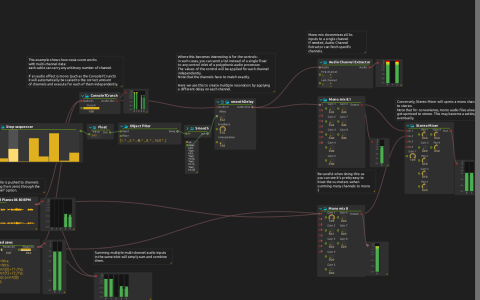
This example uses VU meters to show how channel counts change through a patch. A sound file and an Expression Audio Generator feed both a Mono mix 8 and an Airwindows Console7Crunch. The latter is a mono effect replicated across the incoming channels. Its output feeds a Faust smoothDelay, then another mono mixer and a Stereo Mixer.
The expression generator is labelled Detuned saws, but its saved expression actually multiplies two sine waves and writes the same signal to two channels. An automation changes its a parameter. The sound file uses a start-channel offset of 3, leaving the earlier channels available for other sources.
Setup and observation
Relink Audio/Grand Pianos 06 80 BPM.wav, or choose another sound file. It is not packaged with this score-only download. The graph also requires Faust, Airwindows and Object filter support.
- Start playback and compare the VU meters before and after the mono mixers. Several channels entering a single inlet are summed channel by channel; Mono mix 8 reduces them to one channel.
- Follow Step sequencer → Float → Object filter → Smooth. The filter builds five values using multipliers 1, 2, 4, 8 and 16. The smoothed list drives the Faust delay control independently for each channel. Keep the list size consistent with the processed channel count when changing the routing.
- Compare the Value display’s delay list with the meter after
smoothDelay. Audio Channel Extractor also taps that output with First channel 1 and Last channel 3. - Inspect Stereo Mixer to see the mono result converted to a stereo mix.
The saved final Stereo Mixer feeds a VU meter, not the parent audio mix. To listen, enable its output’s parent-mix routing or assign it to your audio output. The root interval targets audio:/out/main. Lower mixer gains first: summing several channels and using the saved high delay feedback can produce high levels.