Temporal patterns and synchronization
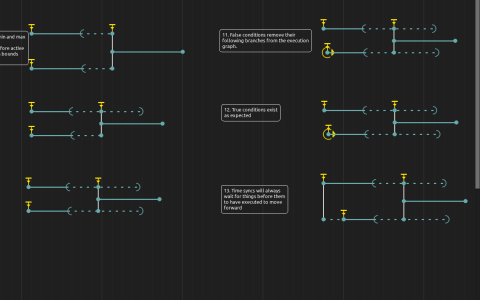
This annotated scenario contains states, events, time syncs and intervals without media processes. Its observable result is the timeline’s execution state, not sound or an image. No external files or devices are needed.
Work through the timeline
- Start playback. The interval connected to the initial state runs automatically; disconnected interactive examples wait for their triggers. Read the nearby annotations before triggering each group.
- Around 15 seconds, compare the branches labelled
Auto-triggerandNo auto-trigger. Use their trigger buttons repeatedly and inspect the auto-retrigger setting: the former rearms after execution, while a default floating trigger alternates between triggering and cancellation. - In the group around 20 seconds, trigger the time sync carrying several events. Unconditional events execute together; the event with
true == falsedoes not start its branch. Compare a single event’s multiple states with separate events on one time sync. - Around 26 seconds, start both incoming intervals of a join. Try the end trigger before and after their minimum durations. Inspect the finite or infinite maximum bounds in the interval inspector.
- Around 33 seconds, compare joins with a false-condition branch, an ordinary branch and a branch that has not yet started. These examples expose how discarded branches and pending predecessors affect the continuation.
The horizontal positions are a layout for the demonstrations, not a promise that each disconnected example will execute at that transport position. Use the trigger buttons while their time syncs are armed.
To reproduce the structures, drag a selected state’s small yellow cross to create another state on the same event. Hold Alt/Option while dragging to create a separate event on the same time sync. A condition belongs to an event; a trigger belongs to the time sync shared by those events.