Mapping and event utilities
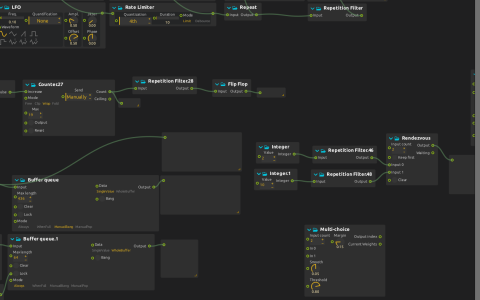
Explore small independent control graphs for filtering, storage, selection and event synchronization.
Explore the connected examples
Start playback in nodal view. This is a workbench, not one continuous processing chain:
- Follow the sine LFO through Rate Limiter, Repeat and Repetition Filter. Compare the adjacent Signal displays: limiting changes the event stream, Repeat resends the retained value, and Repetition Filter removes consecutive duplicates.
- Press the Bang connected to Counter.27. Its Wrap mode and maximum 19 feed a Value display and, through Repetition Filter, Flip Flop.
- Compare the two Buffer queues. One uses ManualBang and SingleValue: press its Bang control to release stored data. The other keeps a WholeBuffer of 64 values and displays them as an 8×8 lightness grid. A square LFO toggles its Lock input.
- Change both Integer controls feeding Rendezvous. Each passes through a Repetition Filter, so resending an unchanged integer is not a fresh event. Rendezvous emits its ordered pair when both inputs have supplied new events.
- Send 1, 2, 3 or the saved 7 from Integer.53 into Switch and compare the three case displays with Unmatched.
- Press Bang.56 to construct
[1,2,5,6,12]through Object filter, then use the Enumerator’s trigger and mode controls to explore that list. A separate LFO drives the multitap Value delay and its Signal display.
Scope and requirements
The Jk Object filter add-on is used for list construction. No media is required. Unconnected processes, including Multi-choice, Value Mixer, Value Filter and the empty Asset Loader, are available for experiments but do not contribute to the saved demonstrations. The Asset Loader belongs to native 3D processing; this patch does not render a scene.
The saved OSC device listens on 9997 and sends to 127.0.0.1:9996, with /faa in its namespace; the Local device uses WebSocket 9999 and OSC 6666. The connected demonstrations above use local cables and do not require an external sender.