Video transforms and fitting
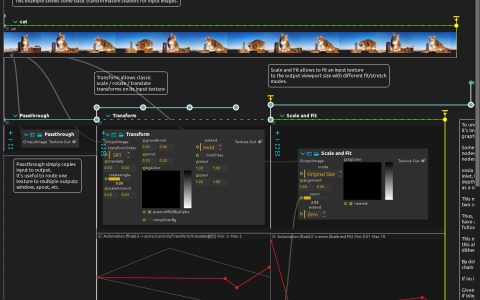
See how the same movie changes when it is moved and rotated, then fitted into a different-sized output. Placement and fitting are controlled separately, so a composition can be adapted to a tall screen or a wide projection without changing its motion.
Placement versus fitting
The first section shows the looping movie unchanged. Transform then animates its translation and rotation. Scale and Fit follows with an animated zoom and a sequence of fitting modes. Continuous automation creates movement, while timeline states switch between discrete ways of occupying the viewport.
Try it
Open the ZIP directly in score and start playback. The animated transform begins at four seconds. Trigger the manual time-sync at the end of Transform to enter Scale and Fit.
- Change the Window render size or aspect ratio, then watch each fitting mode: some preserve the whole image, some crop it, some stretch it.
- Alter a Transform automation curve to change the movie’s motion without changing the output proportions.
- Watch the zoom animation, then a fitting-mode change: the zoom evolves continuously, while the mode switch changes the rule used to place the image at once.
Keep the movie and Scale and Fit intervals running to observe the mode sequence; their ending time-syncs are manual. No camera or network source is required.