Playing synths on MIDI channels 1 and 10
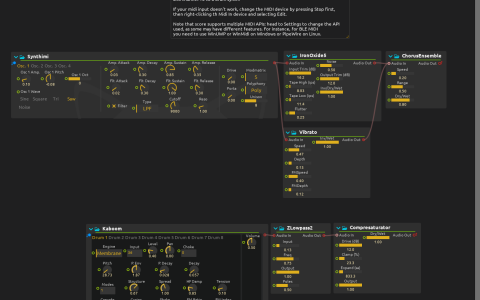
One MIDI connection carries two independent parts: channel 1 plays a layered synth lead, while channel 10 plays drums. Each note reaches only the instrument on its channel, and each part has its own effects.
Choose the channel on your keyboard or software MIDI source. Starting score’s transport does not generate notes: this patch is an instrument for incoming performances, not a sequenced piece.
Setup and sound
- Stop playback, edit
MIDI Inin the Device explorer and select a connected keyboard or MIDI source. Configure score’s audio output. - Start playback at a low volume. Send notes on channel 1 to play Synthimi’s layered, detuned saw oscillators.
- Send drum notes on channel 10 to play Kaboom. Begin with note 36; other notes follow Kaboom’s drum assignments. Alternate between channels to confirm which instrument receives each note.
- Hold a lead note and listen for IronOxide5’s coloration and Vibrato’s pitch movement. These are parallel treatments of the original synth, combined before a shared chorus, not two effects applied one after another.
- Keep a drum pattern steady and lower ZLowpass2’s cutoff, then change Compresaturator’s Drive. The filter removes brightness and the drive adds saturation; both change the drums’ apparent weight without changing the rhythm.
Play a sustained channel-1 phrase against short channel-10 attacks, then adjust the drum filtering: the lead is unaffected.
The build needs Synthimi, Kaboom and Airwindows; no sample files or external plug-ins are required. If your MIDI device is not listed, select a suitable API in Settings and choose the input again. Enable the MIDI device’s velocity-zero-as-note-off option if your controller uses that convention.