Gain

This plug-in simply multiplies its input audio by a gain value.
Metronome

This plug-in outputs a metronome sound, based on the time signature of its parent interval.
The metronome sounds used can be changed: they are in the user library, in the folder “Util” ; the process looks for files named metro_tick.wav and metro_tock.wav.
The second outlet outputs an impulse on each tick.
Stereo merger

This process combines stereo audio signal from N inlets, into one outlet whose channels correspond to the inputs’s channels one after each other (mono input channels are duplicated ; no input means silence on the output).
That is, in the example below, the output of the Merger process will be a 4-channel signal with:
- Channel 0, 1: the audio generator (originally mono).
- Channel 2, 3: the drum loop.
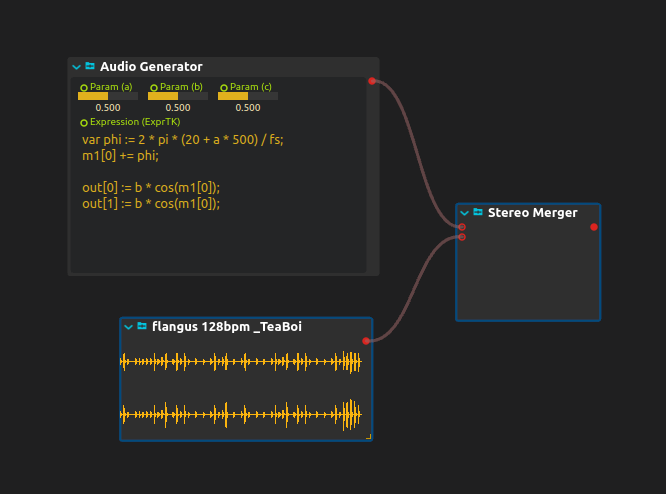
The Four-source Audio Merger walkthrough includes a downloadable multichannel patch.
Audio Splitter
Splits the channels of Input into separate mono Channel outlets. Channels sets the number of outlets; input channels beyond that count are not copied. Use it to route a multichannel bus to separate effects or recorder paths. It separates channels, not frequency bands.
To select a range from a multichannel input, see Extracting Channels from an Eight-channel Recording.
Audio recorder
Audio recorder records an audio bus to a 16-bit WAV file. Set File pattern, enable Record, then disable it to close the take and receive its Filename. %n and %t keep numbered or dated takes.
Beat following
Beat Tracker extracts tempo and beat phase from audio or incoming control events. Unlike the metronome above, it follows an external performance; connect its outputs deliberately to tempo, speed or other controls.