Scala tuning and Wavecycle
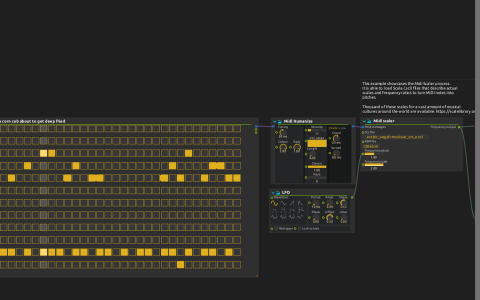
Pattern sequencer → Midi Humanize → Midi scaler turns MIDI notes into frequencies. Wavecycle uses those frequencies to play a hand-drawn waveform; its Frequency inlet can accept a list for polyphonic output.
Midi scaler reads a Scala tuning file and keyboard mapping. The saved paths are /mnt/sda1/scales/arabic_segah-mustaar_on_e.scl and /mnt/sda1/scales/128.kbm. These are author-local files, not included in the download. Choose an appropriate .scl and .kbm on your machine before comparing tunings. The project points to Scale Library as a source of tuning files.
Follow the sound
- Configure audio output, relink the tuning files and start playback. The Pattern sequencer has two stored patterns; select between them to change the note material.
- Change Midi scaler’s Frequency scale or tuning file and listen to the pitch relationships. Its frequency output also passes through Repetition Filter to trigger an ADSR, so pitch changes articulate the sound.
- Follow Wavecycle into the parallel Airwindows
TapeDelay2andChorusEnsemblebranches. They join at Gain, whose level is controlled by the ADSR. - Follow Gain through Compressor, Airwindows
XLowpassand Stereo Mixer to the parent mix ataudio:/out/main. The loopingDeep fryingautomation increases XLowpass’s Dry/Wet over 36 seconds of score time.
A small, fast LFO modulates Frequency adjust. Temporarily disconnect it when comparing the tuning’s unmodulated frequencies. No external MIDI device is needed; the Scala files and the installed Airwindows support are the external requirements.