LED View
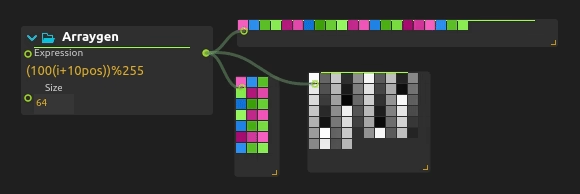
Visualize control signals in real-time for monitoring, debugging, and performance feedback. LED View previews a numerical array as colored cells. Mode selects RGB, RGBW, RGB01, Lightness01 or Lightness8bit. RGB01 and Lightness01 use normalized values; the corresponding 8-bit modes use 0–255 values. RGBW’s fourth component is white, not alpha.
It is useful for instance for visualizing arrays of LEDs, or arrays with large numbers of elements where Signal Display becomes impractical.
Grid sizing
The Size pair requests an explicit layout. Set both components above zero to enable it; the first component determines how many cells are drawn before wrapping to a new row. With the automatic size, wrapping follows the process width instead. Match the grid width to the row width of your incoming pixel data.
LED View only visualizes the values. It does not send data to LEDs, correct colors, or enforce electrical limits. Pixel Utilities can extract values from a texture, and Array utilities can rearrange their channels.
Example
The Generated RGB LED Strip walkthrough includes a patch for inspecting a 192-value array without LED hardware.
Related processes
score comes with multiple processes for monitoring input data LED View, Signal Display, Value display.