Livecoding processes
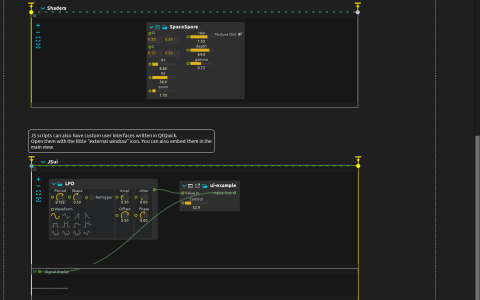
Edit JavaScript, shader code and a custom Qt Quick interface while their processes execute.
Try the three branches
Start playback and release the start triggers for JS, Shaders and JSui. Their ends are also interactive: the branches are not simply fixed-duration clips.
- Open JS with its terminal-shaped editor button. Its tick function sends
Math.sin(10. * in1.value)to a Signal display, with an LFO driving the input. Change the multiplier and press Ctrl+Enter (Cmd+Enter on macOS) to apply the code. - Open SpaceSpore’s shader editor to change the generator shown at
Window:/. Right-click the editor button to choose a panel, separate window or central editor, including the background-render option. - Open ui-example’s external interface to interact with the custom controls while a second LFO supplies Value In. Its output is visible in the adjacent Signal display.
The presets come from the default library: Presets/Javascript/average.qml, Presets/Javascript/ui-example/ui-example.qml, and Presets/GLSL_shaders/gitizenme/SpaceSpore.fs. The saved JS script has been edited despite its average preset origin. The custom interface uses Qt Quick for UI; the visual branch is an ISF shader, not Qt Quick 3D.