FFmpeg input and output streams
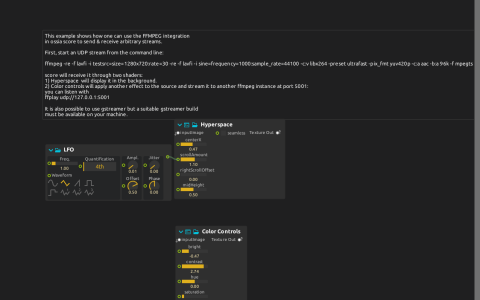
The FFmpeg device receives udp://127.0.0.1:5000. Its FFmpeg:/Video texture feeds two independent ISF shaders: Hyperspace displays a scrolling result at Window:/, while Color Controls sends its result to FFmpeg_out:/Video at UDP port 5001. An LFO changes Hyperspace’s scroll amount.
Run the stream
Use a score build with the FFmpeg device and an external FFmpeg installation with libx264 and AAC encoding. Start this local test source:
ffmpeg -re -f lavfi -i testsrc=size=1280x720:rate=30 -re -f lavfi -i sine=frequency=1000:sample_rate=44100 -c:v libx264 -preset ultrafast -pix_fmt yuv420p -c:a aac -b:a 96k -f mpegts udp://127.0.0.1:5000
Open the score and start playback. Run a receiver for its processed output:
ffplay udp://127.0.0.1:5001
Change Color Controls brightness or saturation and compare the receiver with the Hyperspace window. The saved output uses MJPEG encoding and the MJPEG muxer at 1280×720, 30 fps; it is not an MPEG-TS output despite the input command using MPEG-TS. Output AudioChannels is zero: the generated sine audio is not forwarded by this graph. Keep ports 5000 and 5001 available, and stop the external sender/receiver when finished. No media file is required.