Timed sound and image effects
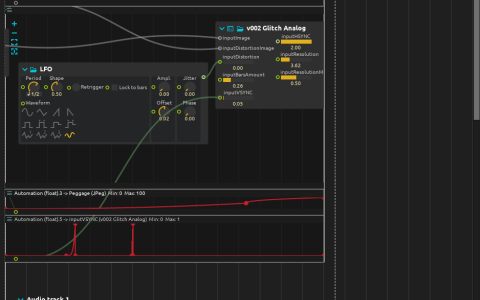
The Scenario starts Video and Audio track 1 together. Video/out.mov feeds JPeg and serves as the distortion image for v002 Glitch Analog. Automations change JPeg Peggage and vertical sync, while a Drift LFO modulates distortion. The result goes to Window:/.
The audio scenario starts its first recording after two seconds, leaves a short gap, starts the second at twelve seconds, then switches to a looping amen break around 42.74 seconds. Its mix feeds Aether; automations change Dry, Late diffusion feedback and Late diffusion drive over the audio interval. Audio is mixed to audio:/out/main.
Try it
Open the ZIP directly in score. It includes Video/out.mov and the Audio directory, containing 000_AMEN.WAV and the two A-study-in-mimicry--vaudeville-sketch recordings ending in 004_00-01-35.wav and 008_00-03-21.wav. Use a build with the JPeg and Aether processes and an available audio output.
Start from the beginning to compare the fixed video duration (about 60 seconds) with the audio edits. Change one automation curve at a time to separate compression artifacts, sync distortion and reverberation. Video and audio are separate processes: replacing the movie does not automatically replace the audio track.