Sequencing audio effects
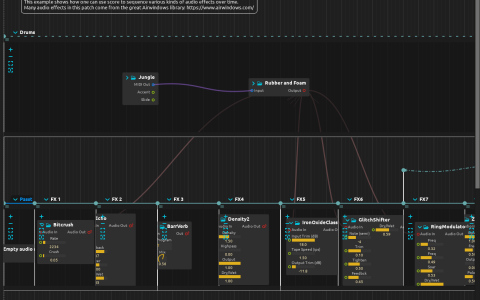
The Drums interval contains the Jungle Pattern sequencer driving Kaboom’s Rubber and Foam preset. Its output is cabled to every effect branch, but those branches occupy successive intervals: the timeline determines which processor is active.
| Score position | Active branch |
|---|---|
| 0–4 s | Empty audio mapper: unprocessed drums |
| 4–12 s | Bitcrush |
| 12–20 s | Echo |
| 20–28 s | BarrVerb |
| 28–36 s | Airwindows Density2 |
| 36–43.5 s | Airwindows IronOxideClassic2 |
| 43.5–52 s | Airwindows GlitchShifter |
| 52–60 s | Airwindows RingModulator |
| 60–68 s | Airwindows ZLowpass2 |
The last interval returns to the RingModulator section through a zero-duration interval. The drum interval has an interactive end, so its nominal 68-second position is not an automatic stop.
Listen and edit
Use a build with Kaboom, BarrVerb and Airwindows available. No samples or external device are referenced. Configure audio output, start playback at a low volume and watch the active effect interval change. Each branch sends its output to the parent mix, ultimately audio:/out/main.
Try changing Echo’s feedback or Bitcrush’s sample rate, then restart that section to compare. Move an interval boundary to change when the sound switches without changing the drum pattern. Trigger the end of Drums to stop the source, or stop the transport to finish the example.