HTTP chat API and rendered text
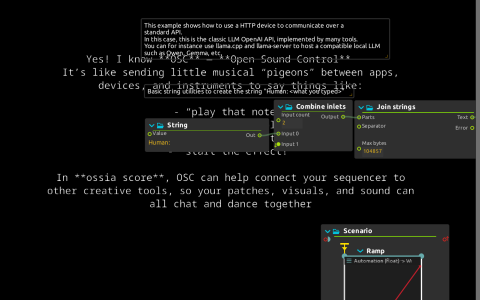
The LLM HTTP device contains an OpenAI-compatible client script. Writing to LLM:/chat/prompt posts JSON to /v1/chat/completions, with conversation history and stream: false. The response is written to LLM:/chat/response and rendered by the Answer JavaScript text process.
A separate String → Combine inlets → Join strings branch prefixes the prompt with Human: for the Question text process. These strings format the on-screen question; the HTTP device itself constructs the API request. Video Mixer combines the two text textures and sends them to Window:/.
Connect a server
- Run an OpenAI-compatible server with a loaded model, for example
llama-server -m /path/to/model.gguf. Neither the server nor model weights are included. - Set
LLM:/config/hostto the base URL, initiallyhttp://127.0.0.1:8080, and set/config/modelto the server’s model identifier ifdefaultis not accepted. Do not append/v1: the script adds the endpoint path. - Start playback, write a question to
LLM:/chat/prompt, and inspect/chat/response. When a response arrives, an auto-retriggering time sync starts a ten-second automation of Answer’s Write On control. - Send another prompt to continue the conversation. Send an impulse to
LLM:/chat/clearto discard history. That action also requests/health; clearing the displayed response depends on receiving its answer.
The device exposes sampling controls, /chat/finish_reason and token counts under /chat/usage. /completion/prompt is a separate, history-free request to /v1/completions, not connected to this display graph.
Requirements and limits
The saved script does not set custom Authorization or Content-Type headers. Use a local server that accepts its requests, or configure a proxy to provide the headers required by your endpoint. It does not authenticate directly to a cloud API. /health/check assumes the server provides /health.
The graphics are JavaScript-rendered text textures mixed with a native ISF shader, not a Qt Quick 3D scene. The saved text preset comes from the default library’s Javascript/advanced-text/advanced-text.qml. No microphone, audio synthesis or external media is involved.