Arranging synth patterns with triggers
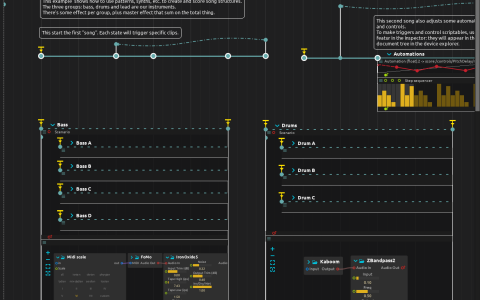
Three instrument groups separate the musical material from the arrangement:
-
Bass: four Pattern sequencers feed Midi scale, FoMo and Airwindows
IronOxide5. - Bells: two patterns feed an Arpeggiator, Midi scale, Synthimi and a PitchDelay.
-
Drums: three patterns feed Kaboom and
ZBandpass2.
Their nested pattern intervals have interactive start and end triggers. States in the outer scenario send impulses to exposed score:/triggers/ addresses, selecting the clips independently of their visual placement. The arrangement includes two looping chains of states rather than a single fixed song ending.
Play the arrangement
No samples or physical MIDI device are required. Use a build with FoMo, Synthimi, Kaboom, Airwindows and BarrVerb; configure the audio device at a low listening level.
- Start playback. Trigger the outer start state near 2 seconds annotated as the first song. It sends
score:/triggers/Trig Bass A; following states trigger drum and bell patterns and return through the arrangement loop. - Open the Bass, Bells and Drums scenarios to watch the named pattern intervals respond. Their interactive ends can also be triggered directly.
- Trigger the second arrangement’s start near 16.06 seconds. It sends
Trig Drum C,Trig Bass CandTrig Bells 2, then enters another loop containingAutomations. - Inspect that interval: two curves write
score:/controls/PitchDelay/dry_wetand/regen; a Step sequencer writes/pitch.
The outer scenario’s audio enters the scriptable master PitchDelay, then DrumSlam, Tube2 and BarrVerb. BarrVerb sends to the parent mix at audio:/out/main. The addresses above are the document’s own exposed controls and triggers, not an OSC server.