MIDI synth and drum effects patch
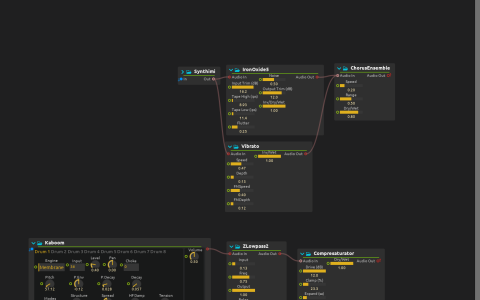
This compact patch uses the same routing idea as Playing synths on MIDI channels 1 and 10, with a different saved Kaboom drum sound and no instruction text box.
Synthimi reads MIDI In:/1. Its output splits into Airwindows IronOxide5 and Vibrato, whose outputs are summed at ChorusEnsemble. Kaboom reads MIDI In:/10 and runs through ZLowpass2 into Compresaturator. The chorus and saturator outputs both feed the parent mix at audio:/out/main.
Play the patch
- Stop playback and edit
MIDI Into select your keyboard or software MIDI source. Set up the audio device and lower the output level before starting: the saved IronOxide5 input and output trims are boosted. - Start playback and send notes on channel 1 to hear Synthimi’s detuned saw voices. No internal sequencer supplies notes.
- Switch the source to channel 10 and send drum notes, beginning with note 36, which is present in the saved device tree. Inspect Kaboom’s selected voice and change Pitch or its pitch envelope to compare the drum sound.
- Adjust ChorusEnsemble’s Dry/Wet for the lead, then ZLowpass2’s frequency and Compresaturator’s Drive for the drums. Trace the two lead branches to distinguish parallel processing from a serial effect chain.
No sample files are referenced. The installed build must include Synthimi, Kaboom and Airwindows, and an actual MIDI input must be selected if the saved default device is unavailable.