Live audio looper with drum backing
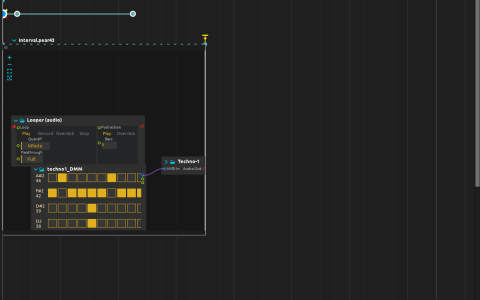
The Looper reads audio:/in/main while a Pattern sequencer plays a Deuterium drum kit. Both outputs enter the parent mix at audio:/out/main. The drum backing is separate from the Looper input: it is not internally cabled into the recording.
Prepare and record
- Open the ZIP directly in score. Deuterium references the bundled
Data/Techno-1/drumkit.xmland the kit’s samples. - Configure the audio device with a working input and output. Use headphones or isolated monitoring to avoid feeding the loudspeaker output back into a microphone.
- Start playback and supply audio to the input. The initial state sets the Looper’s Loop control to
Stop; the state at 0.5 seconds requestsRecord; the state at 4.5 seconds requestsPlay. - Listen for the captured material repeating over the sequenced drums. The saved Looper has Quantif set to 1, so its mode changes follow its musical quantization rather than an unquantized switch.
- Trigger the main interval’s end, nominally placed at 7 seconds, to finish both processes, or stop the transport. That end is interactive and does not automatically fire at its drawn position.
Inspect the three states to see their full target under score:/looper/processes/Scenario.1/intervals/Interval.pear43/processes/Looper (audio)/loop/value. They control the process through the Local device instead of a value cable. The saved Local device ports are OSC 6666 and WebSocket 9999; no remote client is required for these internal state messages.