Weighted and time-based interpolation
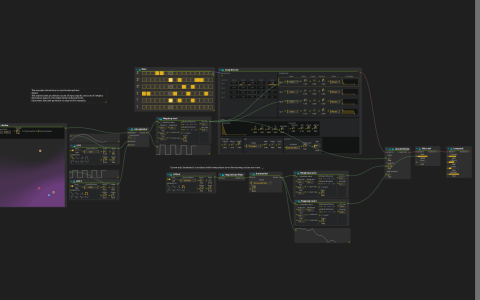
This patch contrasts two operations. Interpolator combines a sine LFO and a square LFO according to weights from Nodes. Easetanbul transitions between successive values of a separate square LFO over time.
PathGenerator supplies moving points. Object filter’s .[0] selects the first point for Nodes, whose two weights feed Interpolator. A Mapping tool scales the result to approximately 0.314–39.933, driving FoMo’s operator 1 and 3 ratios and the Faust delay time.
Try both controls
- Configure audio output and start playback at a low level. A Pattern sequencer plays FoMo’s
Long Bronzepreset through FaustsmoothDelay, Bitcrush and AirwindowsLowpass2, then the parent mix ataudio:/out/main. - Compare the sine, square and interpolated Signal displays. Disconnect PathGenerator’s cable to Object filter and move Nodes’ Input Point manually to change the weights. Its saved Voronoi Mode is enabled; compare that with the other weighting mode.
- Follow the other square LFO through Repetition Filter into Easetanbul. Change Easetanbul’s Delay and compare the eased display with the abrupt source changes.
- The eased output is mapped separately to Bitcrush’s rate (4000–8000) and delay feedback (about 25.153–40.108). Listen to these changes while leaving the weighted branch fixed.
There are no sample files or external devices. The installed build must provide Nodes, PathGenerator, Object filter, FoMo, Faust and Airwindows in addition to the core control processes.