Soundfonts, drum kits and a single-file sampler
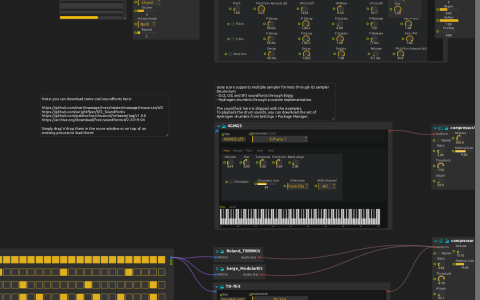
Play a soundfont live, hear one rhythm through several drum kits, and transpose a single recording with an arpeggiated pattern.
Soundfont, drum kits and single-file sampler
The soundfont, Audio/4GMGS.sf2, provides selectable instrument programs for incoming MIDI. The drum section sends the same pattern to the Roland TB909, Serge Modular and TD-7 Hydrogen kits in Data/, making it easy to hear what the choice of kit contributes to a rhythm.
Minibang takes a different approach: one recording is played at different pitches by a piano roll and arpeggiator. Its reference note is 38, which plays the recording at its original pitch. Unlike selecting another soundfont program or kit, transposing this layer reshapes the same source sound.
Try it
- Open the ZIP directly in score; the soundfont, kits and recording are included. If a layer is silent, check its sampler’s file selection. You can also install Hydrogen kits from the Package Manager and relink a drum layer.
- Select an audio output and start quietly. The drum and Minibang branches generate their own notes, so you can explore them without a keyboard.
- To play the soundfont, stop playback, edit
MIDI Inand select your controller. Restart, repeat a short phrase, and change Deuterium’s Instrument control to hear how another program changes that phrase. - Mute individual kit processes to hear the same rhythm through each kit alone. Then combine two: some hits reinforce one another, while others with different attacks make the rhythm feel busier.
- Change Minibang’s piano-roll notes or arpeggiator settings. Notes far from the reference pitch change the recording’s character as well as its pitch.
The build needs Deuterium, Minibang, Faust, BarrVerb and Airwindows. Keep the archive’s sound folders with the score if you extract it manually.