Camera input
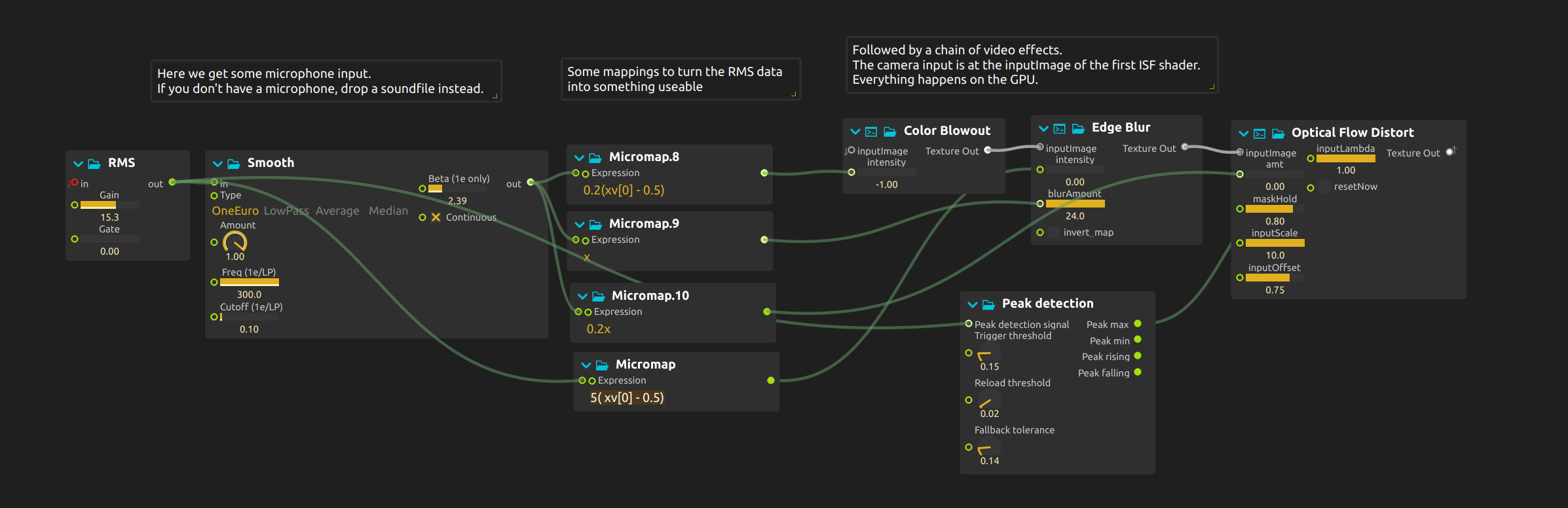
Keep a performer or installation visitor visible while sound changes the color, blur and distortion of their live image.
Image and treatment
Audio analysis turns microphone level into controls for the shader pipeline. Smoothing makes some changes gradual; peak detection resets the distortion on sharper accents. Movement in front of the camera changes the source picture, while sound changes what happens to it.
Setup
Select an available camera in the Camera device settings and a working audio input in the audio settings. Grant camera permission where required and close applications that hold exclusive access to it.
Try it
- Start playback and move silently in front of the camera, then make sound while staying still: movement changes the picture, sound changes the effects applied to it.
- Adjust RMS Gain to suit your input, then lower the smoothing for abrupt responses or raise it for lingering transitions.
- Change peak detection’s trigger and reload thresholds. Clap a few times, then make a sustained sound, and watch when the distortion resets.
Without a microphone, connect a sound-file process to RMS. The recording replaces the analysis source, not the camera.
Learn more
- Analysis - Audio analysis processes (RMS, FFT, pitch, onset)
- Camera Device - Using camera input in ossia score.
- ISF Shaders - Interactive Shader Format effects
- Smooth - Signal smoothing for fluid animations
- Graphics pipeline - How the rendering system works