Mapping textures to editable shapes
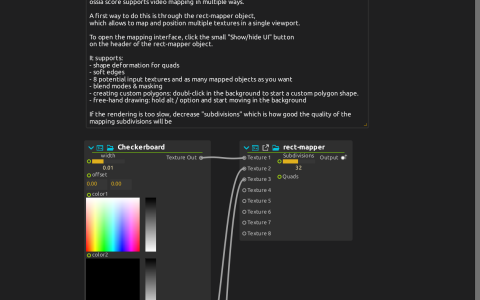
Checkerboard, ColorGrid and Corner Colors feed Texture 1, 2 and 3 of rect-mapper. The mapper has eight texture inlets and sends a composed image to Window:/. An LFO rotates Corner Colors, while ColorGrid reads Window:/cursor/absolute.
Try it
Start playback and click rect-mapper’s Show/hide UI button in its process header. Edit the mapped quads and assign their texture sources. Compare corner deformation, soft edges and blend/mask settings. Double-click the background to start a custom polygon, or hold Alt/Option and draw in the background for a freehand shape.
The saved Subdivisions value is 32; reduce it if fine mesh deformation is too costly. This download uses procedural images and needs no external movie. The mapper renders its mapped meshes with Qt Quick 3D inside a JavaScript/QML process; it is not the native scene-port pipeline.
Install the default preset package containing Presets/Javascript/rect-mapper/rect-mapper.qml and keep its helper files together: MeshUtils.js, ShapeData.js, GeomUtils.js, SnapUtils.js, edgeblend.vert and edgeblend.frag. The score stores the main script and UI, but their relative imports and custom-material shaders still need those files. The UI also imports Qt Quick Controls, Layouts and score’s OssiaUI module. For output split across physical displays, combine the mapper with the Window device’s Multi-window mode.