Audio-reactive point geometry
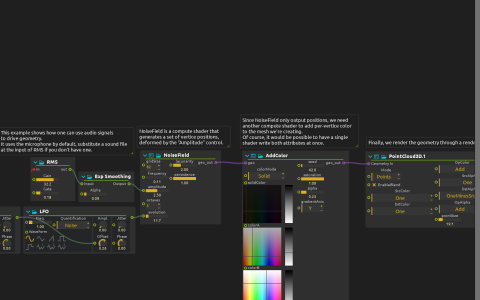
NoiseField creates vertex positions on the GPU. AddColor supplies the colour attribute before PointCloud3D renders the points through a native Render Pipeline. RMS reads audio:/in/main; Exp Smoothing maps its output into NoiseField’s amplitude. Two LFOs independently vary the noise evolution.
Try it
Select a working audio input in score’s audio settings, start playback and make sound. The point cloud’s deformation should respond to the smoothed level, rather than simply following the LFO. Adjust RMS Gain and Gate to suit the input, then change Exp Smoothing Alpha to compare fast and gradual responses.
If no microphone is available, connect a sound-file process to RMS’s audio inlet instead. No audio recording is included. The visual output is Window:/; this uses compute shaders and native rendering, not Qt Quick 3D. Increase gridSize cautiously because it increases generated geometry.