HTTP device
The HTTP device maps score parameters to HTTP requests using QML. It is an outgoing API client, not the HTTP server used by score’s remote-control interface.
The canonical HTTP device callback reference documents request construction, response handling and streaming callbacks. Shared tree metadata and value types are in the QML device API.
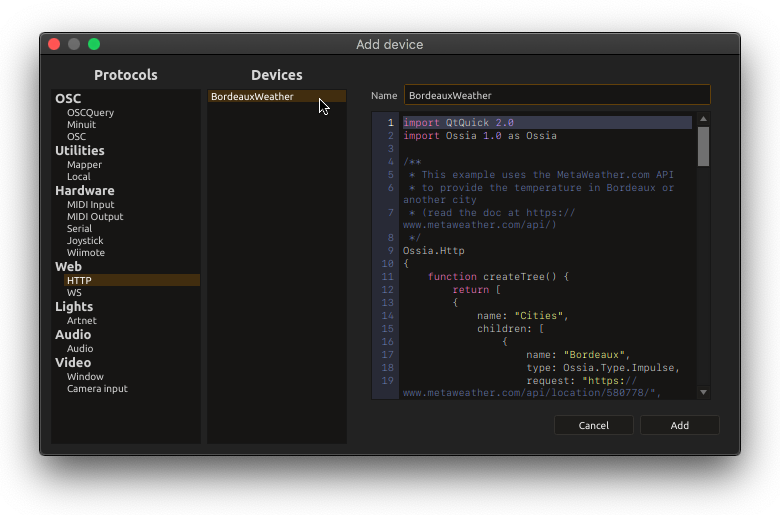
Setup
Add a device, choose HTTP, enter a Name, and provide QML code. The Validate button checks QML syntax/component loading and displays diagnostics below the editor; it does not send a request or prove the remote API works.
The root is Ossia.HTTP. Its createTree() returns parameter descriptions with name, type and optional children. A parameter’s request is a URL string or a function returning a URL; pushing a value to that parameter sends the request.
import Ossia 1.0 as Ossia

Ossia.HTTP {
  function createTree() {
    return [
      {
        name: "refresh",
        type: Ossia.Type.Impulse,
        request: "http://127.0.0.1:8080/status",
        answer: function(body, value) {
          return [{ address: "/status", value: body }];
        }
      },
      { name: "status", type: Ossia.Type.String }
    ];
  }
}
This expects an HTTP service at the given URL. Send an impulse to deviceName:/refresh; on a successful reply, its text updates deviceName:/status. An answer(body, value) callback receives response text and the parameter’s current value, then returns an array of { address, value } updates within this device.
Request and response options
For URL substitution, function arguments, POST bodies and streaming-response caveats, see the HTTP device API. Tree entries do not poll automatically; trigger requests from the score or your script.
For arbitrary HTTP methods, custom headers, status-code handling or bearer authorization, use the object form of Protocols.http in a Mapper device, documented in the QML transport API. Keep credentials out of shared scores.
If nothing arrives, check the server URL and method independently of QML validation, then inspect script/network diagnostics. This device does not expose a listening HTTP endpoint. To serve a browser operator interface, see Remote Control.
Source: HTTPProtocolSettingsWidget.cpp and libossia’s http_protocol.hpp.