Tracking zones to MIDI
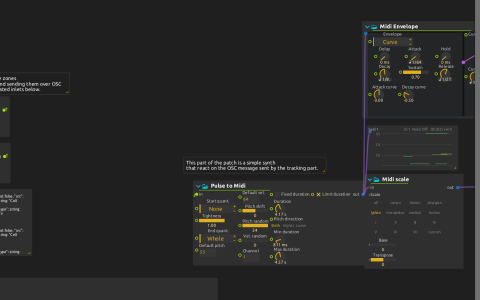
In this camera-controlled instrument, entering a zone triggers a note, and the note’s envelope also shapes the effects. Small movements inside a zone do nothing, so the performer chooses when a sound begins.
Requirements
Open the ZIP directly in score to load the included RetinaFace model. You need ONNX/Pose Detector support, the default library’s tracking-zones JavaScript preset, Jk Object filter, FoMo from Synthimi, Airwindows and Faust. Select a camera for Camera:/ and configure the audio output. The LivePose model pack offers other detectors if you later want to adapt the interaction.
Try it
Start quietly: the saved delay feedback is about 92.5%, so repeated events can leave a long audible tail.
Simulation is enabled in the saved patch. Open tracking-zones’ custom interface and use it to cross its configured boundaries: notes trigger without a camera. Watch the entry and exit displays alongside the sound; then disable simulation to use live face detections.
Change a zone’s placement and repeat the same movement: the note now starts at a different moment. Next, keep the zone fixed and change the note settings. The notes pass through a Lydian scale before FoMo plays them, separating the spatial decision to trigger from the musical choice of pitch.
Entry, exit and note duration
Only entry events trigger notes. Leaving a zone is reported, but does not send note-off: Pulse to Midi determines note duration. Enter a zone, pause inside it, then leave: the exit display updates, but the note’s length was set by Pulse to Midi, not by how long you stayed.
The saved camera connection uses the detector’s Detection output for Source 1. For a model providing multiple independent detections, use the Poses collection instead. The Lightness sampler is unconnected here; sampled image brightness does not trigger the notes.
To observe events in another application, the zones OSC device sends /enter and /exit to 127.0.0.1:9996 and listens on UDP 9997. Local playing does not need any network configuration.