Math expressions and structured objects
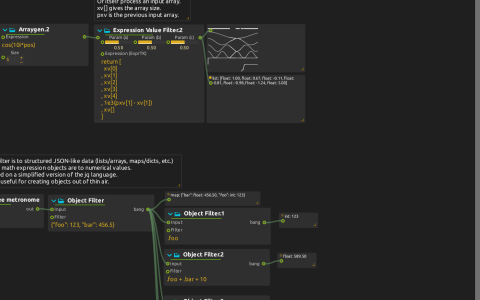
Compare numerical mappings with queries over lists and JSON-like objects.
Numerical branches
Start playback and compare each generator with its neighboring displays. Expression Value Generator evaluates cos(10. * pos)+2a; changing Param (a) shifts that signal. A sawtooth LFO feeds x*a+b in Expression Value Filter. Arraygen evaluates an expression for each index i, with n denoting the array size; the ((i+1) * pos) % 1 branch passes through Arraymap’s pow(x,3).
Other expression processes show how to return arrays and inspect xv and pxv. The seven-value filter returns five current elements, 1e3(pxv[1] - xv[1]), and xv[] (the array size). Keep the input size at least five unless you also edit those indexed expressions.
In the trigger branch, a sample-and-hold LFO feeds Micromap’s x < px. Impulse skips false values and turns the remaining messages into triggers for ADSR and Pulse View. Compare the input, boolean result and envelope displays rather than expecting audio output.
Structured-data branches
With the Jk Object filter add-on available, Free metronome triggers construction of {"foo": 123, "bar": 456.5}. Downstream queries demonstrate field selection (.foo), arithmetic (.foo + .bar + 10), nested arrays, multiple emitted results (.foo, .bar), and a pipe ([.foo, .bar] | .[0]). The arithmetic display should show 589.5.
A separate five-element Arraygen uses 100 * i + pos. Compare selected indices, slices, . (the whole input) and .[] (individual elements) in their Value displays. Edit one query at a time so the difference between an array and several messages remains visible.
No devices or media files are required. The unconnected empty audio/MIDI/value mappers and Passthrough shader illustrate port types, not an active audiovisual output. For syntax, see ExprTK expressions.