Monitoring values, MIDI, audio and textures
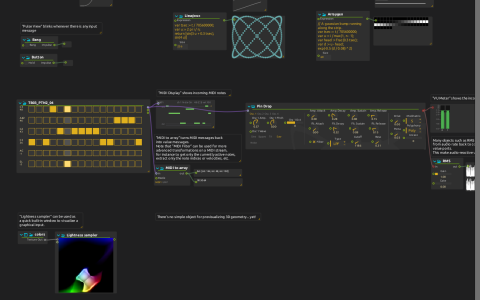
The patch places monitoring processes beside the data they inspect. Start playback and follow each branch in nodal view; no physical controller, sound file or network destination is needed.
Inspect the branches
- A Pattern sequencer feeds Synthimi’s
Pin Droppreset, MIDI display and MIDI to array. Compare the note display with the two Value displays showing the converted MIDI bytes. - The synth feeds VU Meter directly and RMS → Signal display. The meter shows audio level while RMS converts the audio to a control-rate envelope. The saved synth output is not routed to the parent mix, so this branch can be inspected without hearing it.
- Float, 2D and color automations feed Value and Signal displays. A list gives several plotted components; Point2D View interprets the 2D automation as coordinates.
- The color automation feeds two LED Views. Compare RGB01, which groups components as colors, with Lightness01, which displays individual components as intensities.
- An Arraygen expression moves a Gaussian bump across 60 values for another LED View. A second Arraygen creates a moving Lissajous curve for Point2D View.
- Press Bang, then hold Button. Their Pulse Views show the difference between a single impulse and messages sent while held.
- The
colorsISF shader feeds Lightness sampler, providing a texture preview inside the patch.
The graphics branch uses score’s native shader processing, not Qt Quick 3D. The saved shader comes from the default library’s GLSL_shaders/sophia-digital-art/colors.fs; Synthimi is required for the audio-analysis branch. This example’s monitors do not require a separate Window device.