Scrubbing video and scenario time
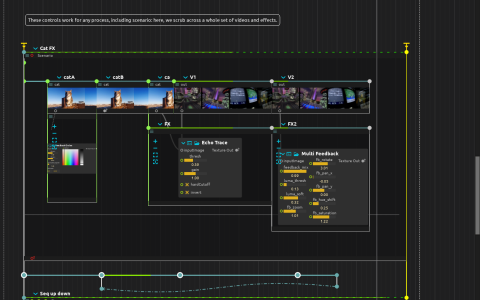
Four manually triggered branches demonstrate different time controls. The first cat interval uses a Tempo curve. The next uses an LFO through 120x to set Tempo, together with sequenced Position jumps. A third drives Tempo’s Speed inlet directly. The Cat FX branch contains a nested sequence of cat and other video clips, FeedbackCircles, Echo Trace and Multi Feedback; a sequencer scrubs the containing scenario.
The modulators live in separate intervals from the media they control, so changes in media time do not also change their own stepping rate. Position values are milliseconds; tempo 120 corresponds to speed 1. Pattern sequencers feed Kaboom percussion, with a further Midi Humanize → Kaboom → Airwindows Edge branch for the scenario-scrubbing section.
Files and playback
This is a loose score. Supply cat.mov beside the project and Video/out.mov, or replace every Video process’s file path. The cat source is credited to Andrew Kota on Pexels. The movies are bundled separately in the Video manipulation and Sound and image example archives. Use a build providing Kaboom and Airwindows for the audio branches.
Start playback, then trigger one of the branch-start time-syncs to compare its time control. Watch that interval’s progress line while changing an LFO or sequencer. For responsive reverse playback and jumps, use an all-intra format such as HAP and the Video inspector’s Direct/Seek playback mode. Buffered forward playback is a different trade-off and can lag when scrubbing.
Textures go to Window:/ and audio to audio:/out/main. FeedbackCircles also reads Window:/cursor/absolute. Local states change score:/controls/Step sequencer/duration; no external controller is required.