MIDI effects and arpeggiation
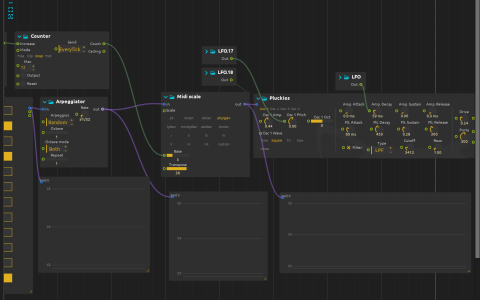
A Pattern sequencer feeds an Arpeggiator, then Midi scale and the Synthimi preset Pluckies. Three MIDI displays tap the original pattern, the arpeggiated notes and the scale-mapped result so the transformations can be compared during playback.
The synth’s audio passes through the Airwindows Drive and ZBandpass2 effects to the parent mix at audio:/out/main. No external MIDI device or sample file is required; Synthimi and Airwindows must be available in the installed build.
Try the transformations
- Select your audio output, lower the listening level and start playback. Compare the three MIDI displays.
- Change the Arpeggiator’s Rate and Octave controls. Its saved rate is 1/32 in musical-time mode.
- Inspect Midi scale: its saved scale identifier is
phyrgian, Base is 3 and Transpose is 36. Change Transpose to move the output register without editing the source pattern. - Follow the square-on-change LFO into Counter and Counter into Base. The wrapping counter, with maximum 12, changes the scale root over time.
- Compare the synth with and without Drive. The remaining LFOs add small oscillator-pitch changes and modulate the amplitude-envelope decay.
This is a generated MIDI patch: connecting an external keyboard is optional, not part of the saved setup.