Reaction-diffusion geometry feedback
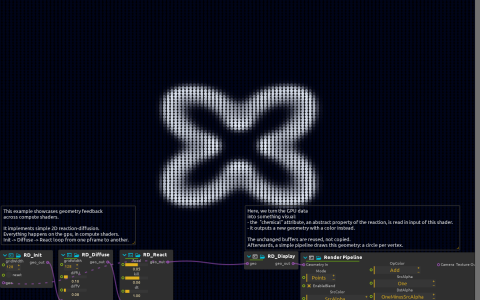
Organic patterns emerge from two simulated chemical concentrations spreading and reacting across a field. The changing concentrations are rendered as colored circles and never settle into a fixed loop.
How the simulation runs
The simulation stores its concentrations in geometry buffers. Diffusion spreads them, reaction changes their balance, and a delayed connection carries the resulting state into the next frame. The displayed image is a view of that state, not the material fed back into the simulation.
Try it
- Start playback and change
feedandkill: small changes switch the pattern between spots, stripes and labyrinths. Press RD_Init’sresetbetween experiments to regrow from a fresh field. - Change
diffUanddiffVseparately; their ratio sets the scale of the structure. - If changing grid width, keep RD_Init and RD_Diffuse consistent; both start at 128. A larger field also means more simulation work.
Use a graphics backend with compute-shader support. No input image is needed; keep the delayed geometry connection when adapting the simulation.