Blending native scene cameras
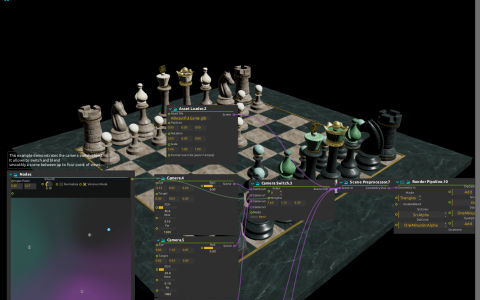
Move between an oblique view of a chessboard, an overhead view and a distant narrow-angle shot with a single two-dimensional control. Blending cameras turns a collection of composed shots into a playable viewpoint.
Three native Camera processes feed Camera Switch. Nodes converts the position of its Input Point into blend weights, so moving across the control changes the camera before the scene is rendered. This blends viewpoint parameters rather than crossfading three rendered images.
Try it
Open the ZIP directly in score; the chess model is included. Start playback and move Nodes’ Input Point toward each of its three nodes, then travel slowly between them. Watch both the viewing angle and framing change.
For a direct cut instead of a continuous move, use Camera Switch’s selection mode and Index. If you replace the model, adjust all three cameras’ Eye and Target values to its scale. The model and rendering shader are included; this uses the native scene pipeline, not a Qt Quick 3D controller.