Tempo Manipulation
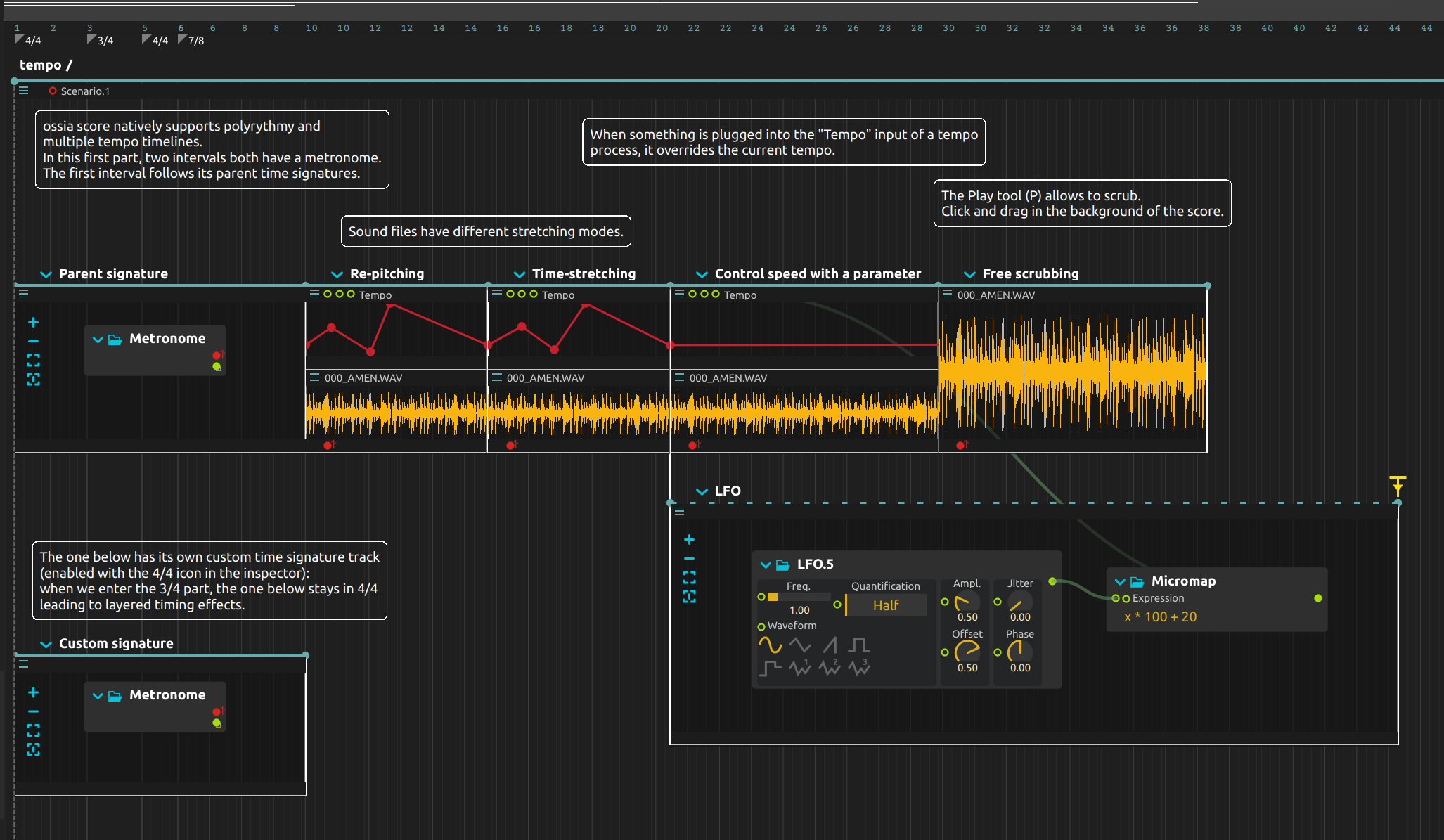
Speed up a recorded rhythm and decide whether its pitch should rise with it. This score plays a loop with re-pitching and with time-stretching, then lets a changing control signal drive the tempo. Before the loop begins, two metronomes show how different metres can coexist inside a shared timeline.
Tempo curves and stretching modes
A Tempo curve shapes the speed of its interval. The sound file’s stretching mode determines how the recording responds, so the same tempo curve can produce either a pitch sweep or a duration change with pitch preserved. A later section replaces the drawn tempo with an LFO-driven value.
Try it
Open the ZIP directly in score; the drum recording is included. Configure audio output at a low level. No external controller is required.
- Start playback and listen to
Parent signatureandCustom signature. One metronome follows the parent’s changes; the other retains its local 4/4 during the parent’s 3/4 section. Follow the signature tracks to connect the changing accents with the two metres. - Listen to
Re-pitching, thenTime-stretching. Both use the same recording with different stretching modes: in the first the pitch rises with the tempo, in the second it stays put. - Reshape one Tempo curve to make an acceleration gentler or more abrupt, then change the sound file’s stretching mode and play it again.
- In
Speed, the LFO drives tempo between 20 and 120 BPM. Lower its rate for a slow rise and fall, or raise it for rapid fluctuations. The connected BPM input takes precedence over the drawn tempo curve. - In
Free scrubbing, select the Play tool with P and drag in the score background. The playback position follows the mouse instead of moving forward on its own.
The loop’s displayed process name differs from the bundled recording’s name; use the file inspector if you need to replace it. The LFO interval has an interactive end, so stop the transport when finished.
Learn more
- Tempo - Tempo process reference
- Musical metrics - Time signatures, quantization, polyrhythm
- Scenario - Timeline container and timing