Audio Effects
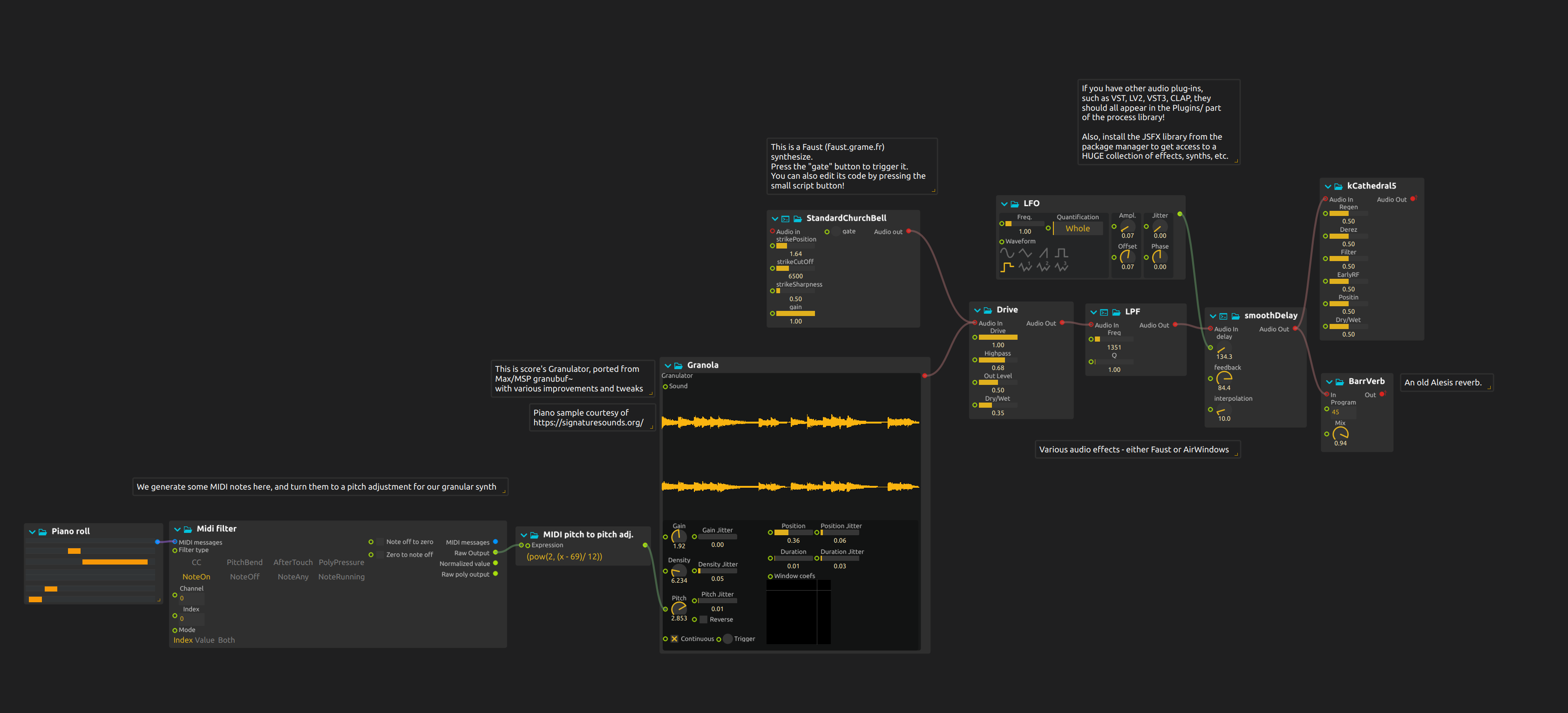
A piano fragment can become a pitched pattern, a distorted pulse or a wash of echoes. Here it shares an effects chain with a bell that you strike by hand, so the same processing is heard on two very different sources.
Signal chain
MIDI notes change the granular piano’s pitch; the bell is played live, independently of the sequence. Both pass through drive, a lowpass filter and a modulated delay before reaching two parallel reverbs. Built-in effects, Airwindows and embedded Faust code work together; no separately installed VST is required.
Try it
- Open the ZIP directly in score. The piano recording is included and credited in the patch to Signature Sounds. Use a build with Granola, Faust, Airwindows and BarrVerb; configure audio output at a low listening level.
- Start playback, then press the Faust bell’s gate control. Listen to the difference between the repeating piano and a single bell strike passing through the same chain.
- Increase delay feedback cautiously to hear repeats persist. Slow the sample-and-hold LFO so each change in delay time is audible on its own: the modulation reshapes the echoes, not the original notes.
- Mute one reverb at a time to hear BarrVerb and Airwindows kCathedral5 separately, listening to the space around an attack and the tail after it.
- Edit the piano-roll notes while leaving the effects unchanged, then replace the piano with your own source.
ossia score can load effects from VST, VST3, LV2, CLAP and JSFX plug-ins as well as Faust. Once available in the process library, they can be used alongside the processors in this example.
Learn more
- Audio plugins - Complete guide to VST, VST3, CLAP, LV2, JSFX plugins
- Faust - Writing and using Faust DSP code
- Audio Effects - Built-in audio effect processes
- Supported protocols and formats - All supported audio plugin formats