MIDI Looper
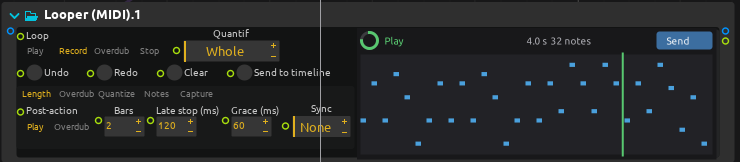
The process named Looper (MIDI) records the notes, controllers, pitch bend and pressure it receives at in into a loop, and plays them back at out. It shares its transport, timing, undo, capture and timeline features with the audio looper and the value looper; this page describes what is particular to MIDI.
The recording keeps its own timing: quantize, transpose and channel changes only apply on playback, and can be changed at any time without losing anything. A take is what the loop plays with the quantize of the moment, but not transposed and on the recorded channels, see Takes and the timeline.
Passes and overdubs
Each recording or overdub is a pass, kept as a layer of its own. Undo hides the last pass, Redo shows it again, Clear forgets everything; Undo or Clear during a recording starts it again at once, its bars counted from there. Start from is in the Play tab; Follow tempo is in the Speed tab.
Overdub mode, in the Overdub tab, chooses what a pass does to the notes of the passes under it:
| Choice | Behavior |
|---|---|
| Merge (default) | Every pass is heard. |
| Replace | A pitch played in a pass silences that pitch in earlier passes, over the part of the loop the pass went through. The rest of the loop is untouched. |
Controllers always replace their own earlier values over the part of the loop a pass went through: a pass that moves CC 74 replaces the earlier CC 74 curve there, and leaves CC 1 and pitch bend alone. Two curves of one controller never fight.
Record, Overdub and the Switches tab
Mode, the Switches, Layers and Speed tabs and the settings Quantize, After record, After overdub, Start from and Stop at work as for the audio looper: Mode is the state of the looper, Play, Stop, Record and Overdub set it, and Rec / Play / Dub, Play / Stop, New layer, Retrigger and the layer actions do what no value of Mode can. Record on a loop that has something in it overdubs it, as on a looper pedal: Clear the loop first to record a new phrase. See there for what each one does and when it is taken up.
| What it is for | What it does to the loop | How layers are cut | |
|---|---|---|---|
| Record | Making a phrase. | Makes the loop: it is as long as the recording, or Record bars bars. On a loop that has something in it, Record overdubs: Clear first to make the phrase again. | The recording is the first layer. |
| Overdub | Playing over the phrase. | Adds what is played, replacing earlier controllers, and notes with Replace, where it goes; with Past the end on Extend, makes the loop longer. | One layer from where it starts to where it stops, made when its first event comes in; with Passes on Per cycle, one each time round that gets something; New layer cuts one where it is pressed. |
| Play, Stop | Listening, or not. | Nothing. | None. |
With After record set to Overdub, or with Overdub on an empty loop, the overdub starts on the very frame the recording ends on. A note held across the end of the recording is one note of the recording, which wraps round the end of the loop to where it was let go; a note played on the first frame of the overdub is the first note of the new layer.
An overdub pass becomes a layer when its first note or controller comes in, not when the overdub starts: until then the overdub runs, the playhead going round as it records nothing, but there is no new layer, no lane for it in the view, and Undo still takes out the last layer there is. The layer starts where the overdub began, and goes as far as the overdub went. An overdub that gets nothing writes no take, adds no layer, and merges nothing; with Passes on Per cycle, a round that gets nothing is no layer either. Past Max layers, the room for the new layer (merging the oldest, or setting a muted layer aside) is made when its first event comes in, and Merge into newest merges only a layer there is.
Max layers, 2 to 32, default 8, and At max layers, in the Overdub tab, work as for the audio looper: past Max layers, a pass is merged into the newest layer when it ends (the default, which undo can take out again until the next pass), the two oldest layers are merged, or the pass replaces the oldest muted layer, else the newest (which undo puts back, and redo replaces again, until the next pass). Merging moves the notes and controllers of a layer into the other; what either of them replaced stays replaced, muted or erased as the merged layer.
The view
The view shows one lane per pass, as the audio looper does: up to 32 lanes, sharing the height of the view, the oldest passes sharing the first lane when there are more. A lane is added when a pass gets its first event; until then the header shows the overdub running. Each lane is a small piano roll of its own pass, over the pitches that pass played. Notes a later pass replaced are drawn dimmed.
Erasing a pass
As with the audio looper, any pass can be erased while the loop plays, with the x of its lane or with Layer and Erase layer, on the grid. Layer is on the newest layer unless it was stepped back. Its notes and controllers go; the passes over it stay where they are, and the loop keeps its length. Erasing the pass being overdubbed is the same as Undo, and erasing the only pass empties the loop. The notes the loop was playing end, as with Undo.
What only the erased pass replaced is heard again. What a later pass replaced as well stays replaced: if the second pass and the third both played a C over the C of the first one, erasing or muting the second leaves the first one’s C silent, because the third still replaces it.
Notes at the edges of the loop
Held notes chooses what a note held across the end of the loop does: Wrap (default) carries it on from the start of the loop, Truncate ends it with the loop.
Grace (ms), default 60, is for a note played slightly before a recording or an overdub starts: it is recorded on the first beat instead of being lost. The other way round, a recording asked to stop a little after a grid point, within Late stop (ms), ends on that point; when it gives way to an overdub, the notes played since the point are the overdub’s, where they were played.
A note held on the input is never sent twice when the loop plays the same note.
Quantize and Note grid
Quantize is when a mode change is taken up: a time, a note value, a number of bars, or the loop itself, as for the audio looper. With Loop, a change waits for the loop to come round to its start, wherever that falls in the bar; before there is a loop, it waits for Record bars bars, or one bar when Record bars is 0. The rest of this section is about the notes, not the mode changes.
Note grid (default a quarter note, 1/4) and Strength (default 0), in the Note grid tab, pull the notes towards a note value when they are played back. Note grid is a note value only, straight, dotted or triplet: it waits for nothing, and only says where the notes go. At a Strength of 0 the notes play as recorded; at 1 they play on the grid. Note ends pulls the ends of the notes too. A note sounding when one of them changes ends where it was going to: the change applies from its next start, and a note moved to where the playhead has yet to go plays there once it has ended.
Notes and channels
- Transpose moves the notes of the loop by semitones.
- In channel chooses the channel recorded; 0 records them all.
- Out channel plays the loop on one channel; 0 keeps the recorded ones.
- Passthrough chooses when the input is heard, as for the audio looper. It is Full by default.
Changing the transposition or the output channel, stopping, undoing, erasing a pass or clearing ends the notes the loop was playing.
Overdubbing an empty loop records it, as with the audio looper.
Tempo changes
With Follow tempo, on by default, the loop plays at the tempo of the score: a loop recorded over two bars lasts two bars whatever the tempo becomes. Off, it keeps the speed it was recorded at. Either way the quantize grid stays on the loop’s own beats, and its takes have the tempo it was recorded at.
Past the end works as for the audio looper: an overdub can make the loop longer, the passes under it repeating.
Takes and the timeline
When a recording or an overdub ends, what is heard of the loop is written to a Standard MIDI File, at the tempo and in the time signature it was recorded in, and ending exactly at the end of the loop. score places a MIDI file by its beats, so a take of two bars is a clip of two bars whatever its tempo. A click on Send in the looper’s view, or a drag from that button, places it in the timeline as a MIDI clip that holds the notes, where the take was recorded. Dragging a lane drops that layer alone, as a clip in a box of its own, muted or not. A take is a loop wherever it goes: its clip loops at the length of the loop, so that a take of four bars is a box of four bars, and making the box longer plays it round again. Dropped on a box that is already there, the looper’s own box for instance, the clip is as long as that box and plays the loop round over it. A MIDI file dragged from a file browser is not a take, and is not looped. When the take has no file of the layer dragged, it is written when the drag starts, the lane saying Preparing until it is there, as for the audio looper. The file can also be opened in any other MIDI editor. Export chooses what Send, and a drag from its button, place, and the files the take written when a recording or an overdub ends has: what is heard of the whole loop (Mix, the default), each pass in a file of its own (Layers), or both; the files go in one box, a looping clip each, the mix first. A take that Send or a drag asks for, or that the score’s stop leaves, has all of them, so that Export can be changed afterwards, as for the audio looper.
A take has the notes where the loop plays them: Note grid, Strength and Note ends are applied to it, and so is Held notes. Transpose and Out channel are not: the notes are at the pitch and on the channel they were played, so that the clip can be transposed or routed again in the timeline.
While a recording or an overdub goes on, Send or a drag from it asks for a take of the loop as it is heard at that moment, the pass in progress included, a key still held lasting up to the playhead; the Send button says Saving until it is written, as for the audio looper. When the score stops while a pass is taken in, the pass is closed as any; Mode then shows Play, and playing the score again plays the loop without recording over it. The score’s stop leaves a take with the mix and a file for each layer whenever the last take does not have them all as the loop is, even though the looper is gone by then: the view, saying Stopped with the score, still drags each lane’s layer, and Send still places what Export says, Export being changed once the score is stopped too.
Reverse and speed
Reverse and Speed, in the Speed tab, work as for the audio looper.
- Played backwards, a note plays where it ended: a note over the first quarter of a one-bar loop plays over its last quarter. A note held across the end of the loop wraps or is truncated as it was forwards: truncated, what was heard of it at the end of the loop is heard at its start. A controller, pitch bend or pressure goes back the way it came: going back over a point where it changed, it takes the value it had before, so a sustain pedal held over a part of the loop is held over that part backwards.
- Speed plays the loop at x1/4 to x4: at x2, a phrase takes half as long. With Follow tempo, Speed applies on top of the tempo.
An overdub records where the playhead goes. A phrase played over the reversed loop plays reversed when the loop goes forwards again, its notes starting where they were let go; a phrase played at x1/2 plays twice as fast at x1. A recording is always made forwards at x1.
The notes the loop was playing end when it turns round.
Comping
As for the audio looper, there is no comp mode: overdub, cut the takes into layers with New layer, with Passes on Per cycle (in the Overdub tab) or with After overdub on New layer, then step through them with Previous layer and Next layer, hear one with Solo layer, and keep the best with Mute layer and Erase layer, or the m and x of the lanes. A note held across the start of the loop belongs to the round it started in. Each layer cut is closed like any, and written in a take.
A muted layer’s notes and controllers are not heard, and it replaces nothing, so with Replace the notes it replaced are heard again while it is muted, unless another layer replaces them as well. Muted layers are left out of the mix of a take, and still have their own file in a take written as layers. The notes the loop was playing end when a layer is muted or unmuted.
Start from In phase
Start from set to In phase keeps the loop in phase with the timeline, as for the audio looper. With Follow tempo, on by default, the position is counted in quarter notes, so the loop comes back on its bars after a tempo change.
Capture
Record starts taking in when it is pressed, or on the next grid point. Capture, in the Length tab next to Capture bars, works backwards: it takes what was already played, recorded or not. You play first, and decide afterwards that it was worth keeping.
- With no loop, the last Capture bars bars played become the loop, and it plays at once; Mode shows Play.
- Over a loop, what was played over the last round of the loop becomes a new layer on top, as if that round had been an overdub pass: each note lands where it was played in the loop, and the loop keeps its length. Capture bars does not apply, one round is taken. A stopped loop is taken as going round where it would be had it kept playing, as In phase has it, and it plays from there. Max layers and At max layers make room for the layer as for an overdub pass, muted layers stay muted, Overdub mode applies to what it plays over, and a take is written as for any pass that closes. When nothing was played over that round, no layer is made, as for an overdub that gets nothing.
Undo takes the captured layer out and Redo brings it back, as for any pass. On an empty loop, Undo empties the loop as it does after a first recording.
Pressed shortly after a point of the grid, within Late stop, Capture ends on that point, as a late stop would: a note held across that point ends there. Capture does nothing while a recording or an overdub is going on.
The MIDI looper always keeps the last 8192 messages it received, so there is nothing to set up; a busy input only lets Capture look back as far as those messages go.
Presets
As for the audio looper, each preset sets every setting, quantized to the bar unless said otherwise, and what is played is always heard.
| Preset | What it is for |
|---|---|
| Song form | Record, Play, Overdub and Play again. Quantize is Loop: the first recording ends on a bar, then every change waits for the loop to come round, and a stop lets it play to its end. |
| One footswitch, song form | The same from Rec / Play / Dub alone, a stop also letting the loop play to its end, with a Late stop of 250 ms. |
| One footswitch, layering | Rec / Play / Dub records, goes straight on overdubbing, and each press after that starts a new layer. |
| Comping, a layer per press | Each press of Rec / Play / Dub while overdubbing starts a new take in a layer of its own; once there are 16, a new take replaces a muted one; takes are written as a mix and as layers. |
| Comping, a layer per round | One overdub, a layer each time round the loop; takes are written as a mix and as layers. |
| Four bars, then play | A recording of four bars, then plays it. |
| Four bars, then overdub | A recording of four bars, then goes on overdubbing: a chord held across the end of the loop is not cut. |
| Free loop | No grid, no Record bars, no Late stop: the loop is as long as it was played for. |
| Overdub drums | Two bars, then overdubbing; notes end with the loop. |
| Drum pattern on channel 10 | Records channel 10 only, two bars then overdubbing; a hit replaces the hits of that pitch under it, notes end with the loop, and play back on the sixteenth. |
| Replace as you play | Four bars, then overdubbing, a layer each time round the loop: a pitch played replaces that pitch in the rounds before it, so each round played over replaces the one before. |
| Sixteenths, 70 percent | Notes pulled 70 percent of the way to the sixteenth on playback; mode changes on the quarter note. |
| Octave up | The loop plays an octave above what was played. |
| Half speed | The loop plays twice as slow; what is overdubbed plays twice as fast at x1. |
| Grows as you overdub | A bar long recording, and Past the end on Extend: overdubbing over several bars makes the loop that long. |
| In phase with the timeline | Start from In phase: a loop played again after a stop, or when the score starts or jumps, is where it would be had it kept playing. |
| Takes for editing | Export on Both: takes are written as a mix and as a MIDI file for each layer. |
Older scores
A score or a preset made with an older MIDI looper loads with the settings it had, as for the audio looper: Loop is now Mode, Quantif is now Quantize, Bars is now Record bars, and Sync is gone. The settings of the notes have new names as well:
- Grid is now Note grid. Its list of note values gives the same note value; its None did what a Strength of 0 does, and gives the default note value, a quarter.
- Quantize, the strength, is now Strength, with the same value. The control now named Quantize is the grid of the mode changes, which was Quantif.
- Quantize ends is now Note ends.
Record on a loop that has something in it now overdubs it, and stopping the score during a recording or an overdub leaves Mode on Play, as for the audio looper.
Capacity
A loop holds up to 4096 notes and 8192 controller values. When it is full, the view says so and further events are not recorded.