Temporal Patching (Glutton Mode)
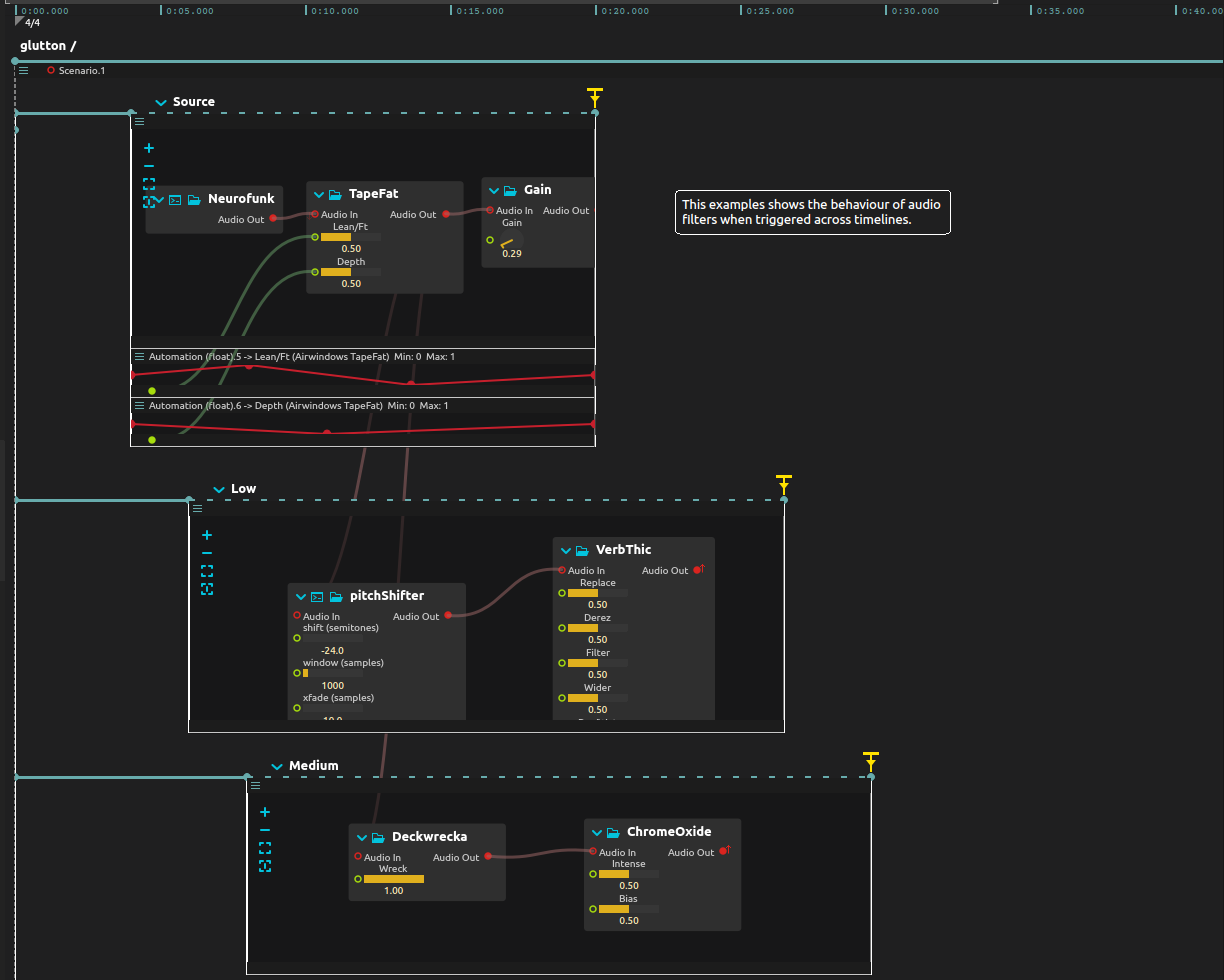
Build a changing sound texture by bringing effects in after the source has already begun. Each new effect hears the source playing now, not a replay from its beginning.
Overview
One generated source feeds three effect intervals with different start times. In glutton mode, their cables pass the available current signal; starting an effect does not retrieve audio from before that effect was active. The source and the effects can therefore have separate lifetimes without turning each entrance into a restart.
Try it
Configure audio output and start playback at a low level. Bytebeat supplies the sound, so no sample file or external controller is needed. The example requires Bytebeat, Faust and Airwindows support.
Listen as the Low, Medium and High effect intervals join the source. End them one at a time and hear which part of the texture disappears. Then replay the score, end Source first, and listen to the remaining tails: stopping the sound’s input is different from stopping the effects themselves.
All four ends are interactive; their drawn positions do not stop them automatically. Leave one effect running longer, then use its end trigger to decide where the passage closes.
See the delayed example, where later effects receive earlier source material. Live input is optional through the saved audio input binding; use headphones if adding a microphone to avoid feedback.
Learn more
- Audio routing - How audio propagates through the timeline
- Audio plugins - VST, Faust, JSFX effect formats
- Audio device - Configuring audio input/output