Basic OSC Example
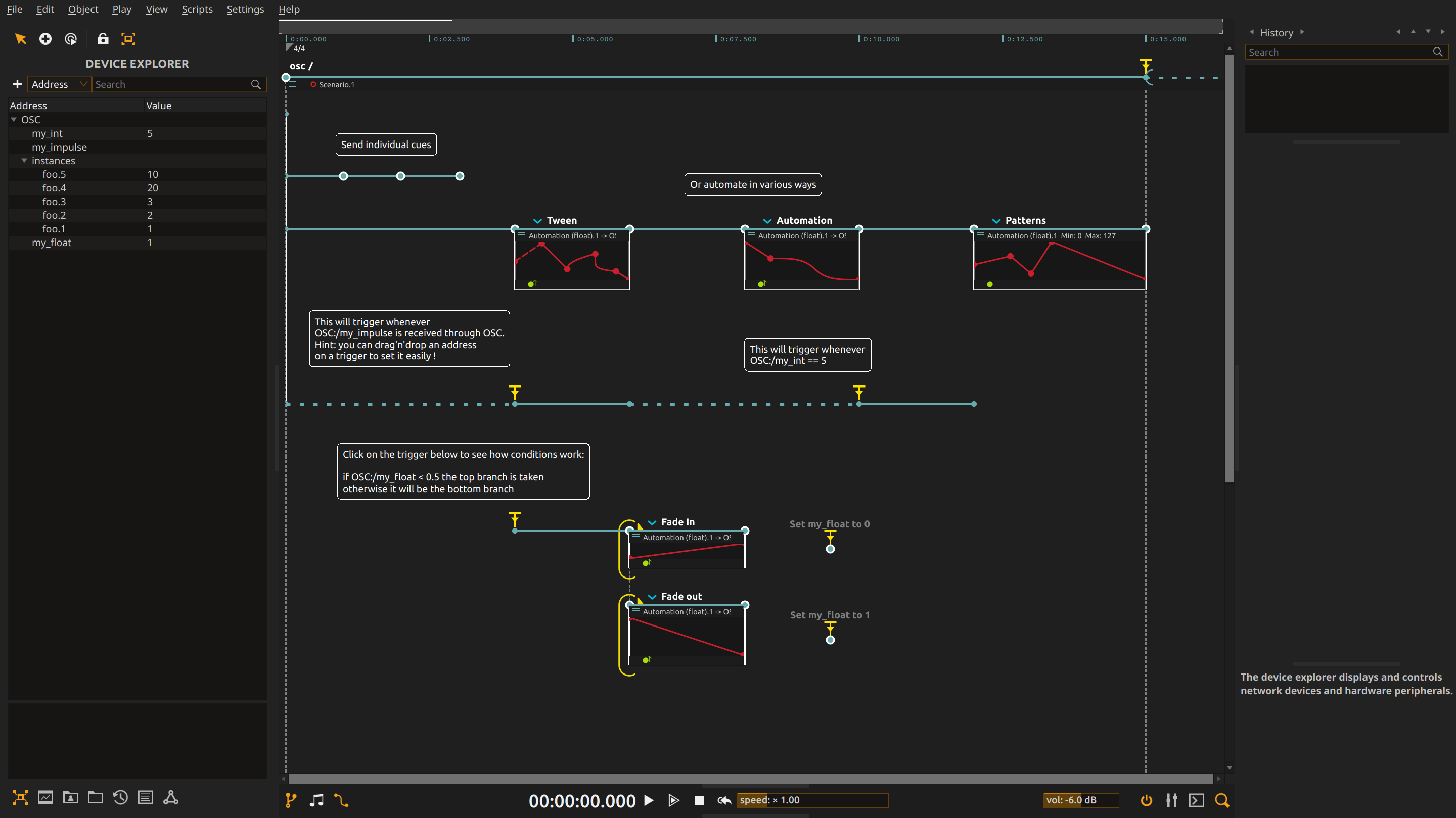
Let score conduct another application, and let that application answer back. Cues and automation can set a synthesizer, visual scene or lighting parameter; incoming messages can release a waiting passage or choose what happens next.
Overview
OSC carries named values and events between multimedia applications and devices. Here, the timeline sends both one-off settings and continuous changes. In the other direction, received values become conditions and triggers: communication affects the structure of the piece, not just its parameters.
The score has no internal sound or image output. Use an OSC monitor to see the exchanges first, then adapt the destinations to your performance system. Ordinary OSC is enough; an OSCQuery server is not required.
Network setup
The saved OSC device listens on UDP 0.0.0.0:9997 and sends to 127.0.0.1:9996. Run an OSC monitor on port 9996 to see output, and send to the computer’s port 9997 to drive the input examples. Change the remote host if your receiving application is on another computer.
The device tree holds example addresses: the float /my_float, the integer /my_int, the impulse /my_impulse, and /instances/foo.1 to /instances/foo.5. Once the monitor receives messages, replace these example destinations with parameters understood by your receiving application. Match each parameter’s type and expected range before letting an automation control it.
Exercise the timeline
- Start playback and watch the device tree or external monitor. A cue sends one value immediately; an automation sends a succession of values along its curve.
- Set the controlled value manually, then play
TweenandAutomation. Tween begins from the current value instead of jumping to a predetermined start, so a manual change is not overwritten by a jump. - Send an OSC impulse to
/my_impulseto release the waiting trigger, then set/my_intto 5 to continue the branch. The sender now controls when the composition advances. - Try the standalone float cues before triggering the conditional branch. Watch the comparison select a fade in or fade out; changing an input can choose a different response without rebuilding the timeline.
The final interval named Patterns has no saved automation destination. Assign an output address before expecting messages from it. See OSC device for network configuration.
Learn more
- OSC device - Full OSC device configuration reference
- OSCQuery device - OSCQuery protocol with automatic discovery
- Working with devices - General device setup guide
- OSC specification - Official OSC protocol documentation