Scripting API examples
Run these JavaScript examples in score’s console. The editing examples share the setup below; start with a new document and run them in order. The later file, UI, network and hardware sections are separate workflows. For signatures and return values, see the document API, devices API, utilities API and view API.
Create a scenario and devices
This creates an OSC device listening on UDP port 19000 and sending to port 19001 on the same machine. Its addresses also give the following examples a tree to edit without an external OSC application.
Score.createOSCDevice("osc", "127.0.0.1", 19000, 19001);
Score.createAddress("osc:/x", "float");
Score.createAddress("osc:/go", "int");
Score.createAddress("osc:/level", "float");
var root = Score.rootInterval();
var scenar = Score.createProcess(root, "Scenario", "");
var itv = Score.createBox(scenar, "00:00:01.000", "00:00:05.000", 0.2);
Score.setName(itv, "example_interval");
// Numeric times are flicks: 705,600,000 per second.
var numericBox = Score.createBox(scenar, 705600000, 3528000000, 0.6);
var next = Score.createIntervalAfter(Score.endState(itv), "2s", 0.2);
var extraStart = Score.createState(Score.startEvent(itv), 0.4);
var extraEnd = Score.createState(Score.endEvent(itv), 0.4);
var parallel = Score.createIntervalBetween(extraStart, extraEnd);
The third argument of createProcess supplies creation data such as a file path. Use an empty string when no data is needed.
Find objects and group edits
var obj = Score.find("example_interval");
var meta = Score.metadata(itv);
console.log(meta.name, meta.label, meta.comment);
var byLabel = Score.findByLabel(meta.label);
Score.select(itv);
var selected = Score.selectedObject();
var selectedObjects = Score.selectedObjects();
var doc = Score.document();

// Group several edits into one undo action.
Score.startMacro();
Score.setName(numericBox, "second_interval");
Score.setComment(numericBox, "Created by the console");
Score.endMacro();
Score.undo();
Score.redo();
Individual command-based edits are already undoable. Score.withMacro(function() { ... }) is another way to group them; it closes the macro even if the callback fails, but does not roll back earlier changes.
Processes, ports and cables
The UUID selects the current LFO, whose rate control is named Period; older LFO versions used Frequency and different port indexes.
var my_lfo = Score.createProcess(itv, "0b1b1816-c33e-4796-a16d-5aab27fe600f", "");
var other_lfo = Score.createProcess(itv, "0b1b1816-c33e-4796-a16d-5aab27fe600f", "");
var period = Score.port(my_lfo, "Period");
var firstInput = Score.inlet(my_lfo, 0);
var port1 = Score.inlet(my_lfo, "Offset");
var outlet_port = Score.outlet(my_lfo, 0);
var inlet_port = Score.inlet(other_lfo, "Offset");
console.log(Score.inlets(my_lfo), Score.outlets(my_lfo));
var cable = Score.createCable(outlet_port, inlet_port);
Score.setAddress(port1, "osc:/level");
Score.setValue(port1, 0.34);

// Get the name of a port.
let name = Score.portName(port1);
let type = Score.valueType(port1);
let min = Score.min(port1);
let max = Score.max(port1);
let vals = Score.enumValues(Score.port(my_lfo, "Waveform"));
console.log(name, type, min, max, vals);
setValue also accepts strings, booleans, integers, vectors and lists, when the target control has that type. This JavaScript process supplies string and boolean controls:
var controls = Score.createProcess(itv, "Javascript", `import Score
Script {
  LineEdit { objectName: "Text" }
  Toggle { objectName: "Enabled" }
}`);
Score.setValue(Score.inlet(controls, "Text"), "foo");
Score.setValue(Score.inlet(controls, "Enabled"), true);
States, messages and automations
Address-based automation currently inserts its curve in the interval’s first slot. If that slot is nodal (for example, after adding an LFO), the application fails its scenario validity check. This example uses a separate empty interval for address automation; control automation creates its own timeline slot.
var a_state = Score.startState(itv);
var endState = Score.endState(itv);
var startEvent = Score.startEvent(itv);
var endEvent = Score.endEvent(itv);
var startSync = Score.startSync(itv);
var endSync = Score.endSync(itv);
Score.setMessages(a_state, [
  { address: "osc:/x", value: 0.25 },
  { address: "osc:/go", value: 1 }
]);
var msgs = Score.messages(a_state);
console.log(JSON.stringify(msgs));
Score.replaceAddress([a_state], "osc:/x", "osc:/level");

// By address: returns an array of new automation processes.
var automationInterval = Score.createBox(scenar, "1s", "5s", 0.8);
var addressCurves = Score.automate(automationInterval, "osc:/x");
// By control: returns one automation and cables it to the control.
var controlCurve = Score.automate(itv, Score.inlet(other_lfo, "Ampl."));
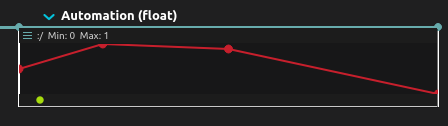
var an_automation_process = Score.createProcess(itv, "Automation (float)", "");
Score.setCurvePoints(an_automation_process, [
  [0, 0.5], [0.2, 1.0], [0.5, 0.9], [1.0, 0.0]
]);
var a_step_sequencer_process = Score.createProcess(itv, "Step sequencer", "");
Score.setSteps(a_step_sequencer_process, [0.1, 0, 1.0, 0.4, 0.5]);

// Delete the spare interval; do not use its handle afterwards.
Score.remove(numericBox);
Triggers and conditions
The setup above creates itv, osc:/x and osc:/go used here.
// A trigger lives on a time sync. Intervals (their end), states and events
// resolve to the time sync they sit on.
Score.enableTrigger(itv);
Score.disableTrigger(itv);

// A condition lives on an event; states resolve to their event.
// Enabling creates a "true" condition that can then be edited.
Score.enableCondition(Score.startState(itv));
Score.disableCondition(Score.startState(itv));

// Set the expression of a trigger (time sync, interval end...) or of a
// condition (event, state). Addresses are written between % signs.
Score.setExpression(itv, "{ %osc:/x% > 0.5 }");
Score.setExpression(Score.startState(itv), "{ %osc:/go% == 1 }");

// Read it back as a string
let expr = Score.expression(itv);
console.log(expr);
// Re-enable the trigger after demonstrating disableTrigger above.
Score.enableTrigger(itv);
Interval properties
Score.setIntervalDuration(itv, 705600000 * 5);
Score.setIntervalMinDuration(itv, 0);
Score.setIntervalMaxDuration(itv, 705600000 * 10);
Score.setIntervalMaxInfinite(itv, true);
Score.setIntervalSpeed(itv, 1.5);
Transport
Run these commands individually so that playback has time to advance between calls. scrub takes milliseconds, not a normalized position.
Score.play();
Score.pause();
Score.resume();
Score.scrub(500);
Score.stop();
var an_interval = Score.find("example_interval");
Score.play(an_interval);
Score.stop();
Score.reinitialize();
var t = Score.transport();
Device snapshots, discovery and live values
var json = Score.deviceToJson("osc");
var oscqueryJson = Score.deviceToOSCQuery("osc");
var dev = Score.device("osc");
console.log(json, oscqueryJson);
Score.iterateDevice("osc", function(address, value) {
  console.log(address, value);
});
var listener = Score.listenDevice("osc");
listener.message.connect(function(address, value) { console.log(address, value); });
Score.setDeviceLearn("osc", true);
// Stop learning after sending the desired OSC messages to port 19000.
Score.setDeviceLearn("osc", false);

var discovery = Score.enumerateDevices();
var oscDiscovery = Score.enumerateDevices("OSCQuery");
discovery.deviceAdded.connect(function(factory, category, name, settings) {
  console.log(category, name, settings);
});
discovery.enumerate = true;
oscDiscovery.enumerate = true;
// Later, when discovery is no longer needed:
// discovery.enumerate = false;
// oscDiscovery.enumerate = false;

Device.write("osc:/x", 0.5);
var val = Device.read("osc:/x");
console.log(val);
var v2 = Device.asVec2([0.1, 0.2]);
var v3 = Device.asVec3([0.1, 0.2, 0.3]);
var v4 = Device.asVec4([0.1, 0.2, 0.3, 1.0]);
var rgba = Device.asColor(v4);
var values = Device.asArray(v3);
To recreate a device with another name, use its saved settings rather than guessing protocol keys. This clone shares the original ports, so disconnect the original first:
var settings = Score.deviceSettings("osc");
Score.disconnectDevice("osc");
Score.createDevice("osc_copy", settings.Protocol, settings);
Score.removeDevice("osc_copy");
Score.reconnectDevice("osc");
For an OSCQuery server running on port 5678:
Score.connectOSCQueryDevice("remote", "ws://127.0.0.1:5678");
// When finished, while stopped:
// Score.removeDevice("remote");
Scripted WebSocket and serial devices load QML text. These functions take the path of a saved device definition; use the complete examples in WebSocket device or Serial device, with their matching server or hardware:
function addWebSocketDevice(qmlFile) {
  Score.createQMLWebSocketDevice("websocket", Score.readFile(qmlFile));
}
function addSerialDevice(port, qmlFile) {
  Score.createQMLSerialDevice("serial", port, Score.readFile(qmlFile));
}
// addWebSocketDevice("/absolute/path/to/device.qml");
// addSerialDevice("/dev/ttyUSB0", "/absolute/path/to/serial.qml");
The following belongs in a Mapper device script, where Device can edit its own tree. toValue unwraps typed values; it is not exposed by the console’s Device wrapper.
Device.addNode("/my/new/parameter", "float");
var unpacked = Device.toValue({ type: Ossia.Type.Float, value: 0.5 });
Device.removeNode("/my/new/parameter", "float");
Prompt and view navigation
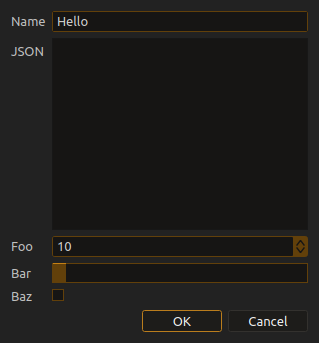
var res = Score.prompt({
  title: "Input JSON",
  widgets: [
    { name: "Name", type: "lineedit", init: "Hello" },
    { name: "JSON", type: "textfield" },
    { name: "Foo", type: "spinbox", min: 0, max: 100, init: 10 },
    { name: "Bar", type: "slider", min: 0.5, max: 10.2, init: 1.0 },
    { name: "Baz", type: "checkbox", init: false }
  ]
});
if (res !== undefined) console.log(res); // Values in widget order.
View.zoom(1.5, 1.0);
View.scroll(100, 0);
Files and utilities
These functions take paths chosen by the caller. saveAs changes the current document’s save path; load opens the saved document.
function saveAndReload(path) {
  Score.saveAs(path);
  Score.save();
  var json = Score.serializeAsJson();
  var text = Score.readFile(path);
  console.log(json, text);
  Score.load(path);
}
function copyFile(source, destination) {
  var data = Util.readFile(source);
  Util.writeFile(destination, data);
}
// saveAndReload("/absolute/path/to/example.score");
// copyFile("/absolute/path/to/input.txt", "/absolute/path/to/output.txt");

Util.shell("echo score", function(result) { console.log(result); });
var text = Util.layoutTextLines("some long text", "Monospace", 24, 100);
var id = Util.uuid();
var ts = Util.timestamp(); // Monotonic seconds, not calendar time.
var timeval = Util.timevalFromMilliseconds(1000);
var time = Util.toTime(timeval);
var ms = Util.toMilliseconds(timeval);
var inf = Util.isInfinite(timeval);
console.log(text, id, ts, time, ms, inf);
function inspectSettings(uid) {
  return Util.settings(uid); // UID of an installed settings model.
}
Process and protocol introspection
var procs = Score.availableProcesses();
var withPresets = Score.availableProcessesAndPresets();
var protos = Score.availableProtocols();
console.log(procs, withPresets, protos);
availableProcesses() and availableProtocols() return objects keyed by UUID. Each entry includes its name, category and documentation link. availableProcessesAndPresets() returns an array of library entries.
UDP and OSC parsing
Keep socket objects alive while receiving. This loopback pair sends text; the OSC receiver is separate because OSC requires binary packets, not an address string written to a UDP socket.
var udpIn = Protocols.inboundUDP({
  Transport: { Bind: "127.0.0.1", Port: 19100 },
  onMessage: function(bytes) { console.log(bytes); }
});
var udpOut = Protocols.outboundUDP({
  Transport: { Host: "127.0.0.1", Port: 19100 },
  onOpen: function(socket) { socket.write("/some/data"); }
});
var osc = Protocols.osc({
  onOsc: function(address, args) { console.log(address, args); }
});
var oscIn = Protocols.inboundUDP({
  Transport: { Bind: "127.0.0.1", Port: 19101 },
  onMessage: function(bytes) { osc.processMessage(bytes); }
});
Send an OSC packet to port 19101 to exercise the parser. See QML protocols for framing and encoding.
TCP and WebSocket connections
These server/client pairs communicate over loopback:
var tcpServer = Protocols.inboundTCP({
  Transport: { Bind: "127.0.0.1", Port: 19102 },
  onConnection: function(socket) {
    socket.receive(function(bytes) { socket.write(bytes); });
  }
});
var tcpClient = Protocols.outboundTCP({
  Transport: { Host: "127.0.0.1", Port: 19102 },
  onOpen: function(socket) { socket.write("hello"); },
  onMessage: function(bytes) { console.log(bytes); }
});
var wsServer = Protocols.inboundWS({
  Transport: { Bind: "127.0.0.1", Port: 19103 },
  onConnection: function(socket) {
    socket.onTextMessage = function(text) { socket.write(text); };
    socket.onBinaryMessage = function(bytes) { socket.write(bytes); };
  }
});
var wsClient = Protocols.outboundWS({
  Transport: { Host: "127.0.0.1", Port: 19103 },
  onOpen: function(socket) { socket.write("hello"); },
  onTextMessage: function(text) { console.log(text); },
  onBinaryMessage: function(bytes) { console.log(bytes); }
});
Unix sockets
On builds with local-socket support (Linux and macOS), use two unused filesystem paths:
var unixDatagramIn = Protocols.inboundUnixDatagram({
  Transport: { Path: "/tmp/score-example-datagram.sock" },
  onMessage: function(bytes) { console.log(bytes); }
});
var unixDatagramOut = Protocols.outboundUnixDatagram({
  Transport: { Path: "/tmp/score-example-datagram.sock" },
  onOpen: function(socket) { socket.write("hello"); }
});
var unixStreamIn = Protocols.inboundUnixStream({
  Transport: { Path: "/tmp/score-example-stream.sock" },
  onConnection: function(socket) { console.log("Connected", socket); }
});
var unixStreamOut = Protocols.outboundUnixStream({
  Transport: { Path: "/tmp/score-example-stream.sock" },
  onOpen: function(socket) { socket.write("hello"); }
});
HTTP
With an HTTP server listening on port 8080:
Protocols.http("http://127.0.0.1:8080/", function(response) {
  console.log(response);
}, "GET");
The object-form request adds headers, request bodies and response status codes.
MIDI and UMP
Open the first available ports, or choose another identifier from the returned arrays:
var inputs = Protocols.inboundMIDIDevices();
var outputs = Protocols.outboundMIDIDevices();
var midiIn, midiOut;
if (inputs.length) midiIn = Protocols.inboundMIDI({
  Transport: inputs[0], onMessage: function(bytes) { console.log(bytes); }
});
if (outputs.length) midiOut = Protocols.outboundMIDI({ Transport: outputs[0] });
var umpInputs = Protocols.inboundUMPDevices();
var umpOutputs = Protocols.outboundUMPDevices();
var umpIn, umpOut;
if (umpInputs.length) umpIn = Protocols.inboundUMP({
  Transport: umpInputs[0], onMessage: function(bytes) { console.log(bytes); }
});
if (umpOutputs.length) umpOut = Protocols.outboundUMP({ Transport: umpOutputs[0] });
System and packages
var enrolled = System.isDeviceMDMEnrolled(); // macOS MDM status.
var cudaDev = System.availableCudaDevice(); // -1 when unavailable.
var hasCuda = System.availableCudaToolkitDylibs(12, 0);
console.log(enrolled, cudaDev, hasCuda);
var installed = Library.installedPackages();
Library.refreshAvailablePackages();
After the asynchronous package refresh completes, inspect available packages and pass the UID of the package you want to install:
var available = Library.availablePackages();
console.log(available);
function installPackage(uid) { Library.installPackage(uid); }