Mapping Tool Range Study
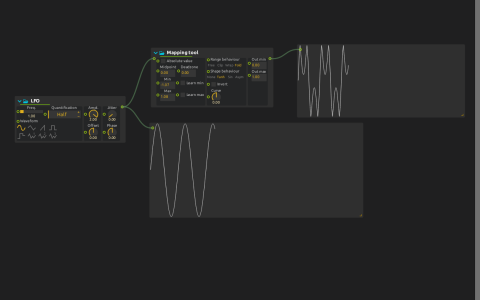
The same incoming movement can produce repeated reversals, flat plateaus or a sharply curved response. This patch places an LFO beside its remapped output to show how a mapping changes the shape of a signal, not just its scale.
The LFO exceeds Mapping tool’s input bounds. Fold reflects the excess back into range, Tanh reshapes the response, and the output is scaled to 0–1. The source is quantized, so some steps already exist before mapping.
Try it
Start playback and watch both displays. Switch Fold to clipping: values beyond the bounds now stop at an edge instead of turning back. Enable Learn min and Learn max while the LFO runs, then disable them to keep the measured bounds: with the LFO’s full range learned, nothing is folded any more.
Adjust Curve to vary the nonlinear response. Only the mapped display should change; the source remains a reference for what your mapping adds. See Mapping tool.