Extracting Channels from an Eight-channel Recording
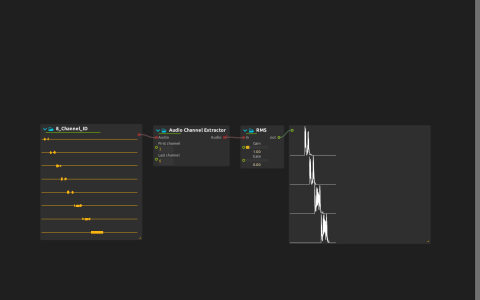
Isolate a few channels from a multichannel recording before deciding where to send them. Audio Channel Extractor selects a contiguous range from the included eight-channel identification recording; the level traces reveal when the selected channels are active. Use it to check a recording’s channel order before routing it.
The First channel and Last channel controls start at 3 and 6. The extracted audio feeds the level displays and also propagates to the main audio output, so it is audible by default: start playback at a low level.
Try it
Open the ZIP directly in score and start playback. Follow the level traces as the recording identifies its channels, then narrow the selection with First channel and Last channel. Only the events on the selected channels remain: selection removes channels from the bundle instead of mixing them together.
To send the selection to specific speakers instead, disable propagation on Audio Channel Extractor’s outlet, explicitly connect the extracted audio to the intended hardware output channels and start at a low level. The recording is included; no external sample package or eight-speaker system is needed to explore the displays.