Combine shader LED arrays
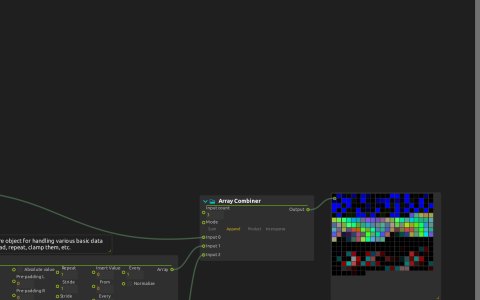
Build a longer lighting pattern from three distinct animations. Each shader supplies one section of the strip, previewed on screen before any physical LEDs are assigned.
Run the preview
Start playback in nodal view. Lightness computer samples each shader on a 10×10 grid and converts the image to color values. Array Combiner appends the three lists end to end; it does not blend corresponding pixels. LED View displays the resulting sequence in RGB01 mode because these samples use the 0–1 range, not 8-bit values.
Change one sampler’s Size and watch that section occupy more or less of the sequence. Use an Array tool on the second or third branch to vary its brightness independently of the other sections.
Padding also changes where colors fall. The third branch starts with 130 padding elements, which is not a whole number of RGB pixels. Try 129 instead: padding now occupies complete triples, preserving the red/green/blue alignment of the following values. Use triplet-aligned spacing when adapting the pattern to a physical strip.
The shaders require a graphics backend but no external media. This score provides a preview, not a configured hardware output. For device addressing and a shader-to-output patch, see LED design.
SilverMaze’s embedded source credits Florian Berger (flockaroo), 2017, under CC BY-NC-SA 3.0; retain its attribution and consider that license when reusing the shader.