Show control software, free and open-source
Cue sound, video, lights and any OSC or MIDI device from one interactive timeline. ossia score runs on Windows, macOS, Linux and Raspberry Pi.
Free and open-source (GPLv3) · Windows, macOS, Linux, Raspberry Pi and web browser
ossia score is used to run theatre and dance shows, concerts, museum installations and events. It combines a timeline with cues, triggers and conditions, so a show can follow a fixed sequence, wait for the stage manager, or react to sensors and performers — all in the same score.
What you can do
- Cues for everything: store and recall the state of your OSC, MIDI and DMX devices as cues, play them from the timeline, by hand, or from an external trigger such as a MIDI controller (cues).
- Scenes and jumps: split a show into scenes, wait for a GO from a trigger, and restart from any point with Play from here (scenes).
- Sound and video playback: multichannel sound files with time-stretching, video with HAP and H.264, effects and plug-ins (VST, VST3, CLAP, LV2) (sound files, video).
- Lights: DMX over Art-Net, sACN and DMX USB, with a fixture library (DMX).
- Timecode: LTC input and output, MIDI clock and MIDI timecode (LTC).
- Control anything: OSC, OSCQuery, MIDI, HTTP, WebSockets, MQTT, serial ports, and Bitfocus Companion modules from the package manager to drive AV equipment (Companion).
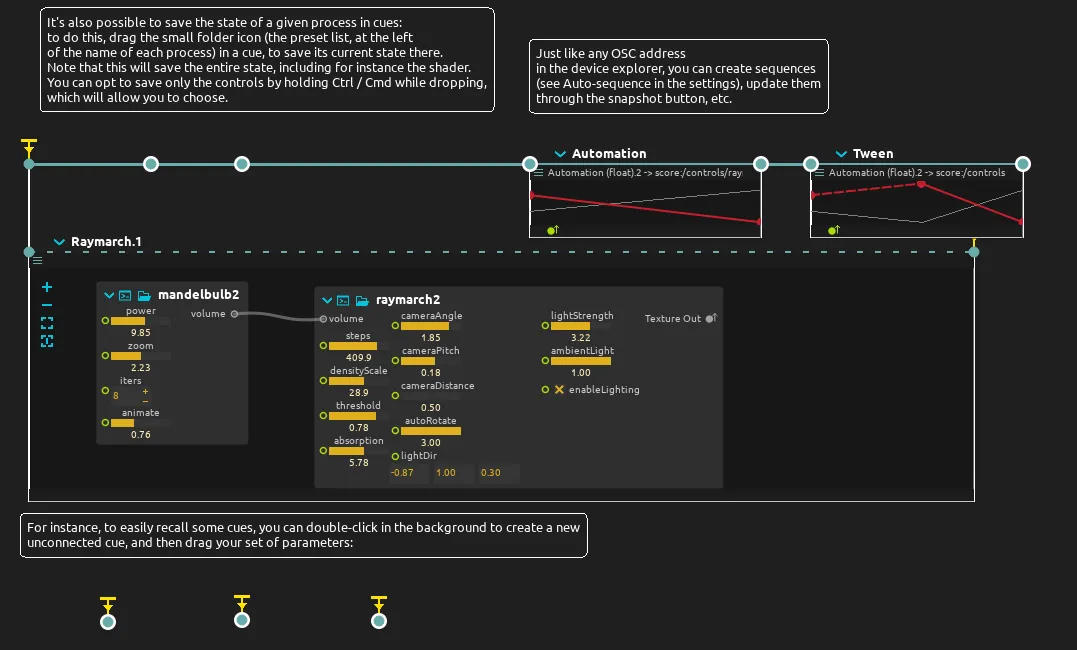
- Cue any parameter: since version 3.9, the parameters of every process (an effect, a shader, a synthesizer…) can be cued and automated like those of an external device.
- Remote control: start and stop the show from a browser, a phone or any OSC controller (remote control).
- Hardware control surfaces: MCU-compatible fader banks follow the process you select, and MIDI controllers can be described once so that their knobs and faders have names (MIDI controllers).
- Follow, scrub and rewind: the tempo synchroniser follows incoming timecode smoothly, and a scenario can be scrubbed or played backwards (timecode synchroniser).
- Alternating cues: the exclusive mode plays one interval at a time, for sounds or videos that replace each other.
- Show files that travel: collect all media into the project folder, find missing files, and archive the show as a zip.
- Launch other programs and shell commands from the timeline (process launcher).
Show control needs, and how ossia score answers them
| What you need | How ossia score does it |
|---|---|
| A sequence of cues, each started with GO | Scenes that each wait for a GO from the keyboard, a MIDI controller, OSC or a browser, and Play from here to restart anywhere. |
| Running on Windows, Linux or a Raspberry Pi, with no licence to buy | Free and open-source on every operating system, with the same features everywhere except for features tied to an operating system or to hardware, such as Spout, Syphon or CUDA. |
| Shows that react to performers or the audience | Triggers, conditions and branching scenes, fed by sensors, cameras, tracking systems or any OSC or MIDI message. |
| Sound, video and lights in one show file | Multichannel sound, video, 3D, DMX lights and OSC/MIDI devices on the same timeline. |
| Controlling AV equipment: projectors, video switchers, cameras | Bitfocus Companion modules, installed from the package manager, run directly inside ossia score. |
| Following timecode | LTC in and out, MIDI clock and MIDI timecode. |
ossia score can run a whole show on its own, and it can also drive the software and hardware you already have over OSC, MIDI or DMX — for instance a media server, a lighting desk or a DAW.
Who uses it
Theatre and dance companies, music ensembles, museums and festivals: see the gallery for shows and installations made with ossia score.
Free and open-source (GPLv3) · Windows, macOS, Linux, Raspberry Pi and web browser