Museums and permanent exhibitions
Run sound, video, lights and interactive exhibits all day without staff, monitor them, give the team a simple control panel, and hand over projects that keep working. Free and open-source, on Windows, macOS, Linux and Raspberry Pi.
Free and open-source (GPLv3) · Windows, macOS, Linux, Raspberry Pi and web browser
A permanent exhibition has to start by itself every morning, play for months, and be fixed quickly by people who did not build it. ossia score runs the media and the interactive parts of an exhibit, from a single screen to a whole route of rooms.
What you can do
- Start by itself: open a project and play it on startup, without the editor, after a delay if plug-ins need time to load (headless mode, command line).
- Run on small hardware: Raspberry Pi and other Linux boards, with hardware video decoding, and without a desktop environment (embedded devices).
- Watch it from afar: a system device reports CPU, GPU, memory, battery and network use, and every parameter can be read over OSC and OSCQuery; display updates can be turned off on low-power machines.
- A panel for the staff: start, stop and trigger scenes from a browser, a phone or a tablet on the local network (remote control).
- Kiosk applications: package an exhibit with its own touch interface as a standalone application, without the editor (see custom apps).
- Projects that can be handed over: collect all media into the project folder, find missing files, and archive the project as a zip (project files).
- Synchronised rooms: sound, video, lights and props on the same timeline, with cues and scenes; control AV equipment through Bitfocus Companion modules from the package manager (cues, scenes).
- Visitor interaction with buttons, sensors, cameras and depth cameras (see interactive installations).
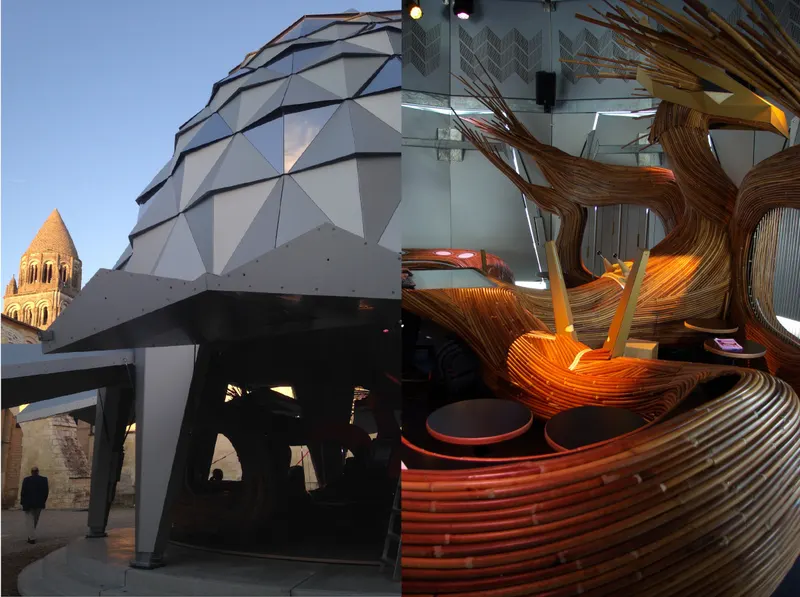
Carousel Musical, Blue Yeti, Abbaye aux Dames.
Exhibition needs, and how ossia score answers them
| What you need | How ossia score does it |
|---|---|
| Exhibits that start every morning without anyone | Autoplay on startup, headless mode, and no editor window on screen. |
| Many exhibits on an affordable budget | Free software, and Raspberry Pi or mini PCs instead of dedicated media players. |
| Knowing when something goes wrong | System monitoring and every parameter readable over the network. |
| Staff who are not technicians | A browser control panel, or a custom touch interface with only the buttons they need. |
| A project that outlives its author | Media collected into one folder, open file formats, and the same project on every operating system. |
See the gallery, filtered on museums, for exhibits made with ossia.
Free and open-source (GPLv3) · Windows, macOS, Linux, Raspberry Pi and web browser